

Main UI
Source
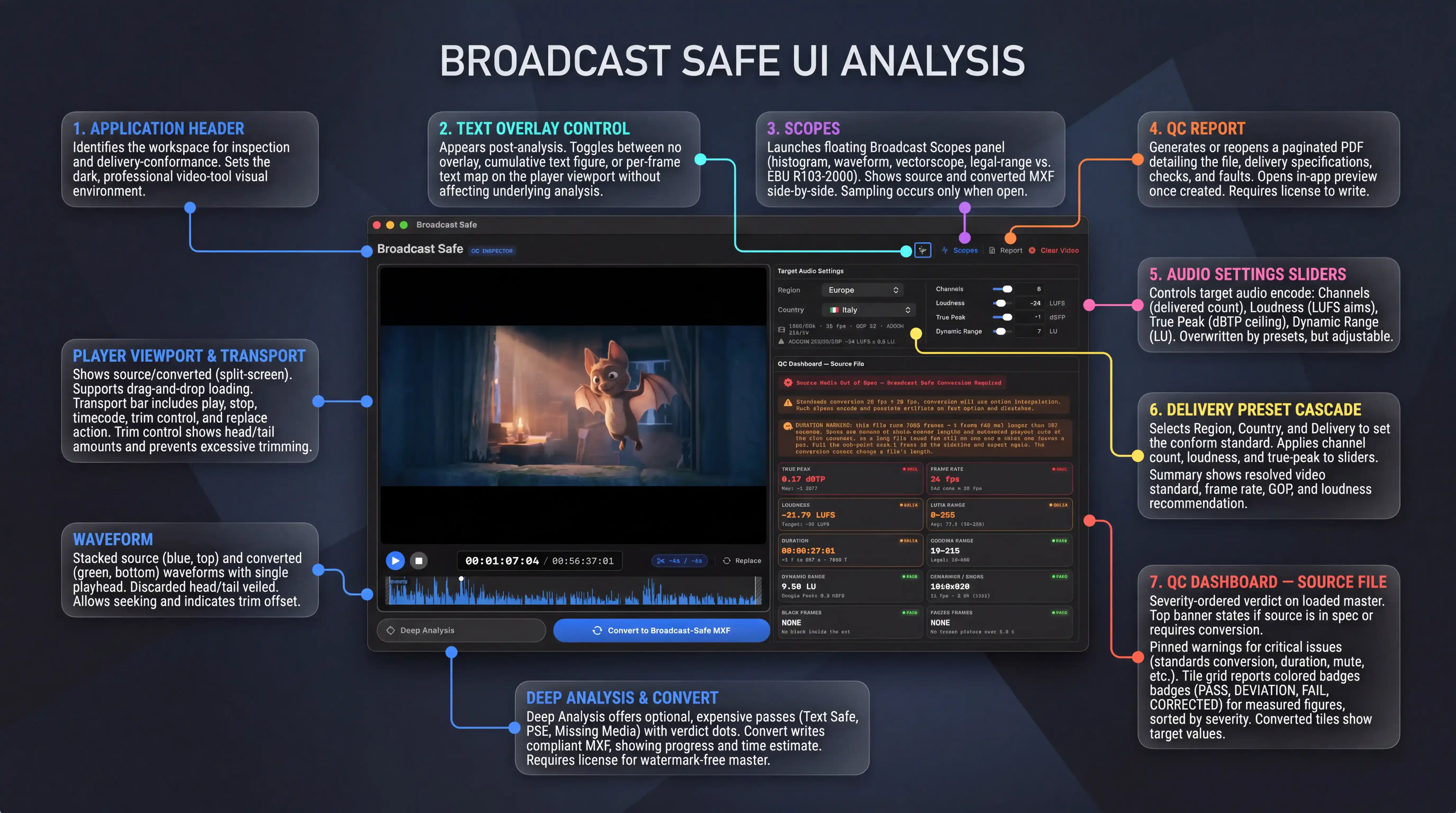
The window is the operating surface for preparing a source master for broadcast delivery. It is divided into seven annotated regions: the application header, the text-overlay control, the Scopes launcher, the QC Report control, the target audio sliders, the delivery preset cascade, and the QC dashboard. The player viewport, transport bar, waveform, Deep Analysis control, and Convert control sit around them.
1. Application Header
- The app wordmark and the "QC INSPECTOR" badge identify the screen and its purpose: an inspection and delivery-conformance workspace.
- Establishes the dark, video-tool visual environment the whole window inherits.
2. Text Overlay Control
- Appears only once a text-rectangle analysis has produced something worth drawing.
- Selects whether nothing, a cumulative figure of all text found, or the moving per-frame text map is drawn over the players. Changing it changes what is visible on the picture without affecting the underlying analysis.
3. Scopes
- Opens the floating Broadcast Scopes panel, which shows the source and the converted MXF side by side: histogram, waveform, vectorscope, and a legal-range verdict against EBU R103-2000.
- Sampling runs only while the panel is open, so a closed panel costs nothing.
4. QC Report
- Writes or reopens the paginated PDF describing the file, the delivery it was judged against, every check, and every place a fault was found.
- Once a report exists it opens in the in-app preview instead of writing a duplicate; any edit that changes what the report was built from invalidates it and returns the control to export. Requires a license to be written.
5. Audio Settings Sliders
- Four numeric controls that fix the audio the encode will target:
- Channels — the delivered channel count, applied to the layout and to the number of mono tracks written.
- Loudness (LUFS) — the integrated loudness the normalizer aims at.
- True Peak (dBTP) — the ceiling the normalizer will not exceed, and the figure the source is graded against.
- Dynamic Range (LU) — the loudness range; never overwritten by a preset, because no published specification states one.
- Channel count, loudness, and true peak are overwritten when a delivery preset is applied; the operator can move any of them afterwards.
6. Delivery Preset Cascade
- Region, Country, and (only for territories that publish more than one specification) Delivery select the territory whose published standard the encode will conform to.
- Applying a preset pushes its channel count, integrated loudness, and true-peak figures into the sliders and sets the video standard the encode targets.
- The summary line beneath shows the resolved video standard, frame rate, GOP length, and loudness recommendation, plus any caveat from the source document. An amber warning triangle marks figures that are approximations rather than published requirements.
7. QC Dashboard — Source File
- A severity-ordered verdict on the loaded master against the currently selected delivery.
- The verdict banner at the top states whether the source is within specification or requires conversion.
- Pinned warnings above the grid carry the findings that change what the operator does next: a standards conversion, a duration that is not on a whole-second boundary, a head/tail mute shortfall, missing-media cards, black or frozen passages, or a surplus of audio channels.
- The tile grid reports each measured figure with a colour-coded pass, deviation, fail, or corrected badge. Failing and deviating tiles are sorted above passing ones. Tiles that only have something to say when they are wrong appear conditionally; tiles backed by a Deep Analysis pass appear only once that pass has been run.
- In Converted mode the tiles the conversion actually changes report the target values with a corrected badge; the diagnostic-only tiles carry their source verdict across unchanged because the encode does not touch what they measure.
Player Viewport and Transport
- The viewport shows the source. Once a conversion has produced a preview, it becomes two synchronised viewports — source on the left with a blue accent, converted MXF on the right with a green accent.
- Dropping a MOV, MP4, or MXF file onto the viewport loads it as the new source, replacing the current file and starting a fresh measurement pass.
- The transport bar carries play, stop, the source timecode (which is never shifted to the in-point, so positions always name the same frame as the operator's timeline), the trim control, and a replace action.
- The trim control shows the current head and tail amounts without being opened, turns red when the two figures together would leave under a second of programme, and refuses that trim outright rather than exporting something nobody asked for.
- The stacked waveforms below show the source lane on top in blue and the converted lane below in green, sharing a single playhead. Discarded head and tail are veiled and hatched across both lanes. Dragging anywhere seeks within the trim range; the converted lane is narrowed and offset when a trim is applied so both waveforms describe the same instant at the same position.
Deep Analysis and Convert
- Deep Analysis opens a popover offering three optional, expensive passes: text safe, PSE flash, and missing media. Each pass states what it measures, against what standard, and what it will cost before offering to run. A pass that came back clean is treated as spent on the current file. The capsule shows up to three verdict dots for the passes that have run.
- Convert writes the broadcast-compliant MXF alongside a modal progress sheet reporting the current pass, a percentage, and a labelled time-left estimate. It is unavailable while a conversion is running or when the trim is excessive. An unlicensed copy still converts, but the resulting picture carries a visible watermark; a clean master is never produced without a license.
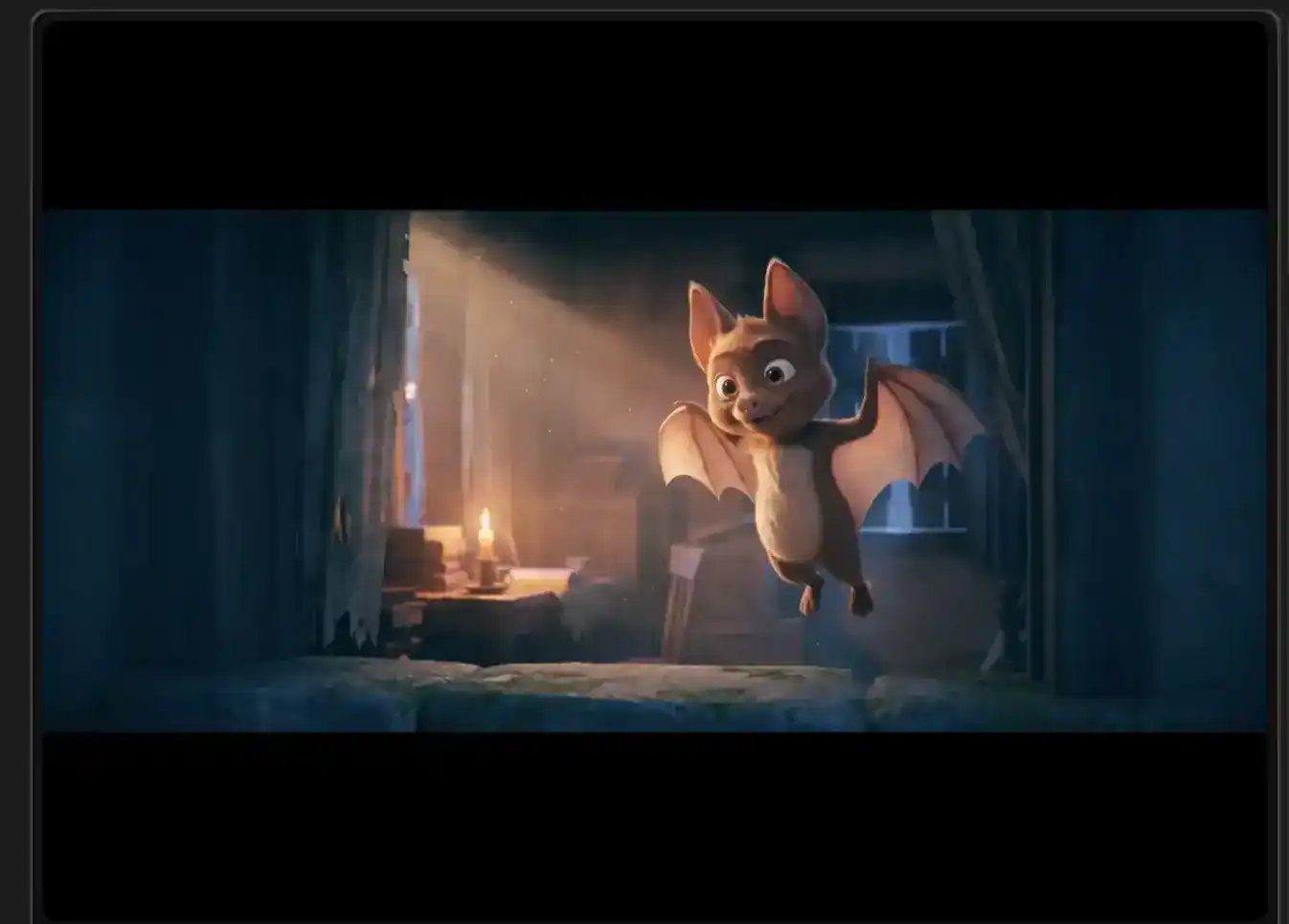
- Shows the picture of the loaded source master at the current playhead position, confined to the full width of the working area.
- The image is letterboxed against a black surround so the whole frame is visible without cropping or stretching, preserving the source's aspect ratio for judging composition, safe areas and picture faults.
- While only a source file is loaded, this is the sole viewport. Once a conversion has produced an MXF and its playable preview, the same area becomes the left-hand viewport of a side-by-side comparison, retaining its blue accent and its label so the source and the delivered file are never confused.
- Selecting it makes its audio the monitored feed and points waveform display, scrubbers and playback state at this media rather than at the converted one.
- The picture is informational only: it carries no overlaid transport or playback affordances of its own. All movement, scrubbing and position changes are issued from the transport controls and the waveform area, keeping a single set of controls governing both viewports.
- When the text-safe pass has been run, the detected text blocks and the 5 % text-safe margin are composited over the picture here, at the same normalized coordinates in both viewports, so a violation can be read against the delivered frame as well as the source.
- Dropping a compatible video file onto this area replaces the working file, which in turn clears the previous analysis, conversion and preview and begins measuring the new master.

This segment governs synchronized playback of the loaded source and any converted preview, reports source-relative frame position and duration, summarizes the active head/tail trim, and offers source replacement.
- Toggles synchronized playback: starts or resumes both the source and, when present, the converted preview together; when running, pauses both. If playback is parked at the end of the retained range, it wraps to the trim entry point.
- Halts playback and returns the playhead to the first frame of the retained delivery range, or to the start of the source when no trim is applied.
- Displays the current source-relative position and the full source duration as SMPTE timecode. The current figure counts at the source’s own frame rate and is not shifted by an active trim, so it continues to identify frames by their position in the original master.
- Reports that a trim is active: removing 4 seconds from the head and 6 seconds from the tail. These are the amounts excluded from analysis, preview, and the delivered MXF; opening this summary exposes the head/tail editor, entry-format choice, and trim removal.
- Starts a source replacement: prompts for a different master to load, which clears the current analysis, conversion result, preview, and trim so the newly selected file begins from the configured defaults.

The horizontal band represents the complete audio programme of the loaded source master, drawn against an opaque near-black backing so that signal level reads as a proportion of full scale. Everything shown is positioned in the source file's own timebase, from its first frame to its last.
- SOURCE marks the band as the audio of the original file, colour-matched to the source picture pane. Its presence distinguishes this row from the second row that appears beneath it once a delivery has been produced.
- The blue trace plots the instantaneous amplitude of the programme audio across the entire source duration. Taller excursions represent louder passages; the drawn height is absolute amplitude, so the full height of the band corresponds to full scale. Quiet and loud material can therefore be compared directly at a glance.
- The white marker on the vertical line indicates the current playback position within the source. The line spans the full band height so the position is legible regardless of where the trace happens to sit at that instant.
- Pressing or dragging anywhere across the band repositions playback to the corresponding instant, moving both the source and the delivered preview together. Dragging tracks the pointer continuously rather than jumping at release.
- The grey diagonally-hatched region at the left is the head of the source that will not be included in the delivery. Its width is proportional to the duration being removed, and the trace beneath it remains visible so the operator can see what is being discarded.
- The equivalent hatched region at the right is the tail of the source being removed. When a duration is long enough for the text to fit, the amount removed is written inside the band as a signed figure in seconds.
- The thin bright vertical rule at the inner edge of each hatched region marks the exact boundary of the retained programme. Seeking into a discarded stretch settles on the nearest boundary rather than playing material that will not be delivered.

These elements manage the main window arrangement, broadcast scopes visibility, QC report access, and clearing the currently loaded media.
- Sparkles glyph — Opens the main window layout choices. Auto adapts between side-by-side and stacked based on available width. Side by Side places the player area and QC inspector in two columns. Stacked places the player area above the QC inspector. The chosen arrangement changes only how existing content is grouped, not the loaded media or analysis state.
- Scopes — Toggles the floating Broadcast Scopes panel. When visible, it compares source and converted video frame-for-frame, showing histogram, waveform, vectorscope, and the EBU R103 legal-range verdict. Measurements for the converted side come from the delivered MXF rather than from the playback proxy, so the scopes describe the actual export. Sampling runs while the panel is open; closing it stops sampling.
- Report — Exports a new QC report PDF or opens the current report when one still describes the loaded file and no state has invalidated it. The report presents source and delivery verdicts, measured checks, applied corrections, remaining manual actions, and evidence frames. The lock form indicates QC report export is license-gated; without a valid license it remains unavailable and explains that requirement. It is also unavailable until analysis is complete or while report export is already running.
- Clear Video — Clears the loaded source and all derived state: analysis results, conversion result, preview files, playback, and associated dashboards. It does not delete or modify the source file. It returns the interface to the empty drop zone so another master can be loaded.
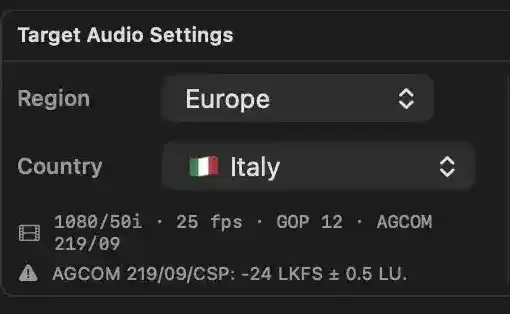
Establishes which national broadcast specification the loaded master will be conformed to. Choosing a territory resolves the video standard, frame rate, GOP structure and loudness recommendation from a bundled catalog of published delivery documents, and pushes the published audio targets into the four numeric audio controls beside this panel. Selections persist, so a facility delivering to the same broadcasters reopens on the last-used territory.
- Region — Selects the geographic grouping whose countries are offered beneath it. Changing the region clears the country and any delivery variant below it, so the cascade can never hold a country from a different region. A "Custom" entry leaves no preset applied and permits the audio figures to stand on their own.
- Country — Selects the territory whose published specification will govern the delivery. Picking a country applies its default delivery variant: the required output channel count, integrated loudness and true peak are written into the audio controls. A third level appears only for the territories that publish separate specifications for cable/pay-TV and open/local television.
- Preset summary — States what the resolved specification actually requires: the target video standard and its frame rate, the group-of-pictures length the delivered file must carry, and the loudness recommendation the numbers originate from. Here, 1080/50i interlaced at 25 frames per second with a 12-frame GOP, measured against AGCOM 219/09. This is the video standard the encode will target, not the standard the source file is in; where the two differ, the encode must retime or convert the picture, and the dashboard reports which.
- Specification caveat — Reproduces the conditions the source document attaches to this territory, flagged by a warning triangle. Here it confirms the loudness target and its permitted tolerance: −24 LKFS with a 0.5 LU allowance either side. A caveat is also where an approximated loudness figure is disclosed for territories whose documents publish only a legacy analog alignment, so the operator knows the number carried into the audio controls is an inferred equivalent rather than a published requirement and must be confirmed with the broadcaster.
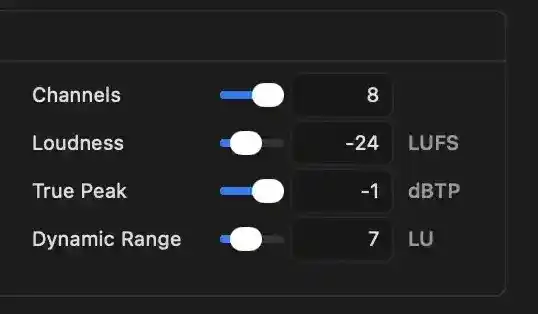
Defines the audio targets applied to the broadcast-safe MXF during conversion. These values drive normalization and encoding and are persisted for future sessions.
- Channels: Sets the number of delivered audio channels. The displayed value 8 requests eight-channel audio, determining how many separate audio tracks are written and whether the output matches the destination specification. Selecting a country preset replaces this value.
- Loudness: Sets the target integrated loudness in LUFS. The displayed value −24 LUFS is the average loudness normalization aims to achieve. Compliance is judged within 1 LU as passing, within 4 LU as a deviation, and beyond as a failure. A country preset replaces this value.
- True Peak: Sets the maximum permitted true peak in dBTP. The displayed value −1 dBTP is the ceiling the encoder enforces. Samples above 0 dBTP fail; samples above the ceiling but below zero are treated as deviations. A country preset replaces this value.
- Dynamic Range: Sets the target loudness range in LU. The displayed value 7 LU is the intended spread between quiet and loud passages. Country presets do not replace this value because published delivery specifications do not define one; the operator controls it directly.
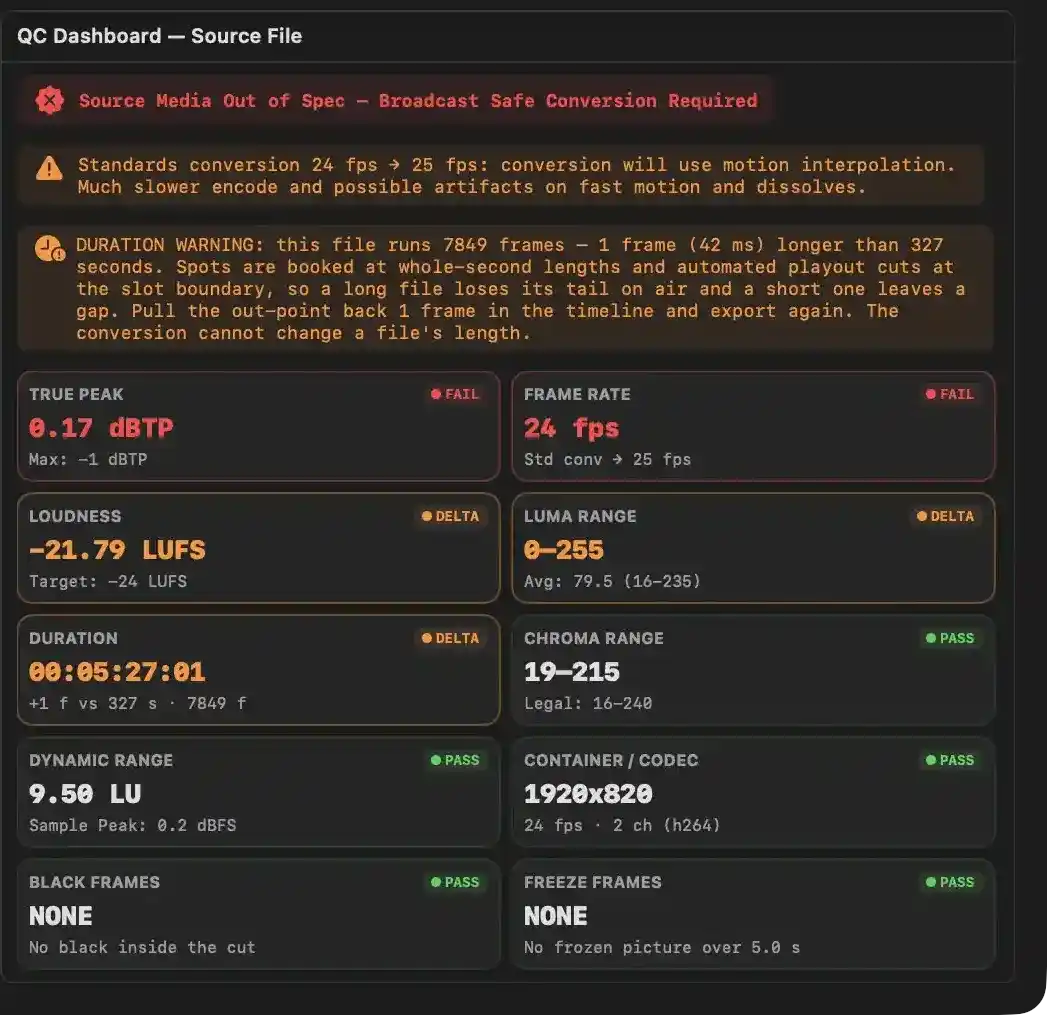
Displays the measured compliance of the loaded source file against the active delivery specification before any conversion is run. The readouts indicate what the conversion will correct, what it cannot correct, and what the operator must address in the source timeline.
- The red source verdict indicates the file does not currently meet the selected delivery specification and that a broadcast-safe conversion is required before delivery.
- The amber standards conversion warning indicates the source frame rate is 24 fps while the target is 25 fps, so the encode will use motion interpolation, making the export substantially slower and risking artifacts on fast motion and dissolves.
- The amber duration warning indicates the file is one frame longer than the nearest whole-second length, which matters because spots are booked at whole-second boundaries and the conversion cannot alter the file’s duration.
- The True Peak readout reports FAIL because the measured true peak is 0.17 dBTP, exceeding the delivery ceiling of −1 dBTP and the absolute clipping threshold of 0 dBTP.
- The Frame Rate readout reports FAIL because the source is 24 fps and requires standards conversion to 25 fps, meaning the delivered file will not be a native master.
- The Loudness readout reports DELTA because the measured integrated loudness is −21.79 LUFS against a −24 LUFS target, a deviation the conversion’s loudness normalization will correct.
- The Luma Range readout reports DELTA because the measured range is 0–255 against the legal 16–235 window, indicating excursions the conversion’s legalizer will clamp.
- The Duration readout reports DELTA because the file is 00:05:27:01, one frame longer than 327 whole seconds, and the conversion cannot change the file’s length.
- The Chroma Range readout reports PASS because the measured range is 19–215, inside the legal 16–240 window.
- The Dynamic Range readout reports PASS, showing 9.50 LU with a sample peak of 0.2 dBFS.
- The Container / Codec readout reports PASS, showing 1920×820 resolution, 24 fps, two audio channels, and H.264 coding.
- The Black Frames readout reports PASS because no black passages exist inside the retained programme material.
- The Freeze Frames readout reports PASS because no frozen picture passage exceeds the 5.0-second reporting threshold.
Waveform
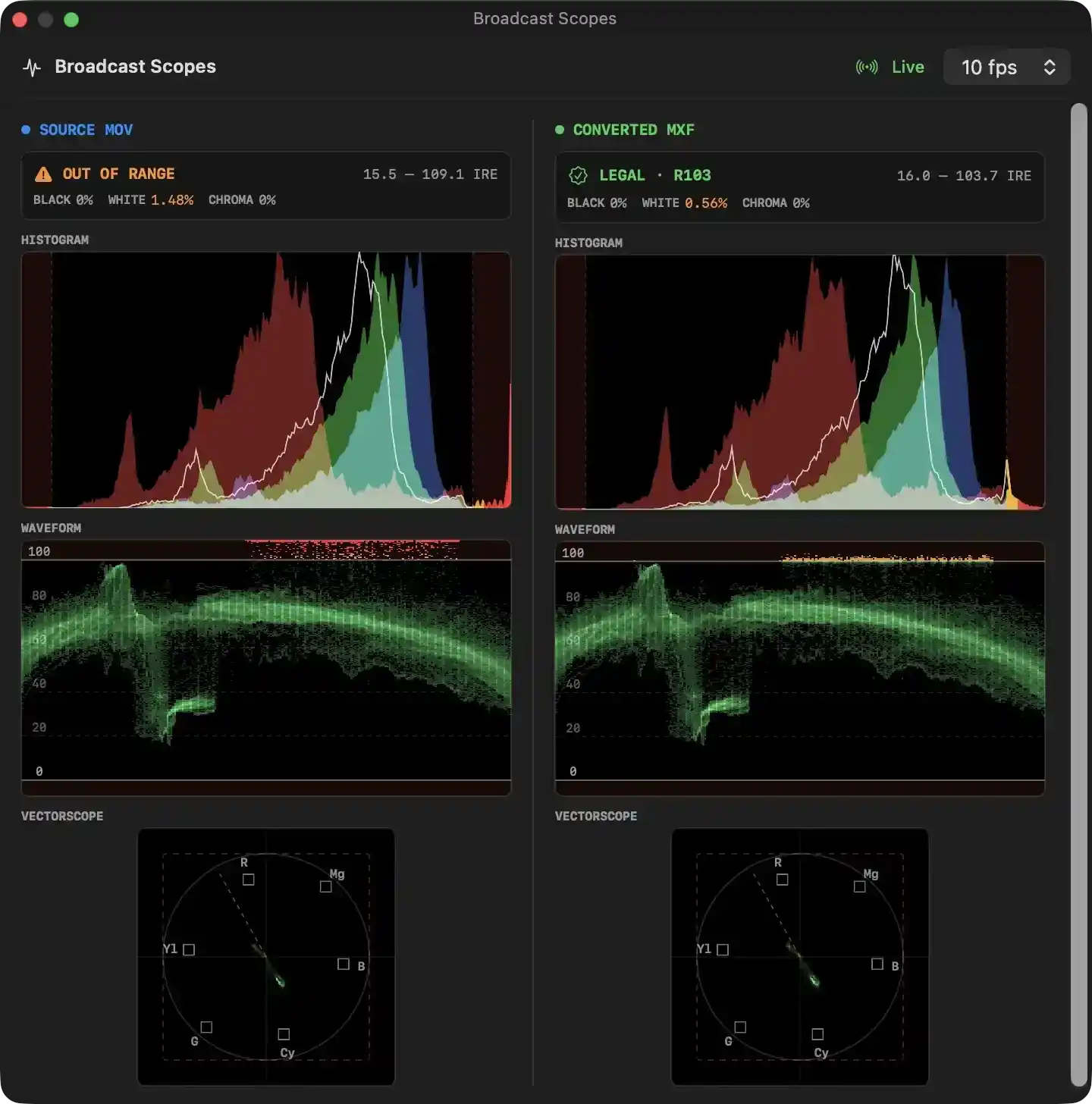
Broadcast Scopes Analysis Interface
This interface provides a real-time visual analysis of video levels, comparing a source master file against a converted, broadcast-legal version.
Global Controls
- Live / Freeze Selector: Controls the operational mode of the analysis engine. Toggling this either samples the video frames continuously during playback ("Live") or halts updates to hold the current measurement on screen ("Frozen"), allowing detailed analysis of a single frame without stopping the playback clocks.
- Sampling Rate Configurator: Defines the refresh rate of the scope rendering (measured in frames per second, such as 10 fps). Adjusting this value scales the processing resource consumption; lower frequencies reduce CPU usage on high-resolution sources, while higher frequencies provide smoother, more responsive visual feedback.
---
Side-by-Side Analysis Columns
The interface is divided into two symmetrical columns to compare the original video (Source MOV) on the left with the conformed video (Converted MXF) on the right.
##### 1. Compliance Verdict Strip
- Legal Range Verdict: Displays a color-coded evaluation of the frame's compliance. An orange warning designates an "OUT OF RANGE" signal, indicating luma or chroma excursions beyond acceptable thresholds. A green indicator designates a "LEGAL" or "LEGAL • R103" status, confirming compliance with EBU R103-2000 standards (where up to 1% of samples are tolerated outside strict limits to account for codec ringing).
- Signal Range Readout: Identifies the absolute minimum and maximum luma values detected in the active frame, expressed in IRE units.
- Excursion Percentages: Reports the exact percentage of pixels falling below legal black (code 16), above legal white (code 235), or outside the legal chroma gamut (code 16–240).
##### 2. Histogram
- Color and Luma Distribution: Graphs the normalized pixel-population curves for red, green, blue, and luma channels across the 8-bit code value spectrum.
- Illegal Zone Boundaries: Features shaded red regions on the far-left and far-right margins. These highlight where signal details extend into forbidden super-black or super-white regions, visually demonstrating the effect of the legalizer's clamping action on the converted output.
##### 3. Waveform
- Luminance Plot: Traces luma intensity across the horizontal width of the frame, mapped against a standardized grid ranging from 0 to 100 IRE.
- Excursion Alarms: Highlights out-of-range luma peaks with contrasting warning dots (colored red or yellow) near the 100 IRE ceiling, indicating exactly where highlights require clamping.
##### 4. Vectorscope
- Chrominance Coordinate Plot: Displays hue and saturation levels on a circular grid derived from the Rec. 709 color space.
- Color Targets: Provides reference boxes for 75% saturated primary and secondary colors (Red, Magenta, Blue, Cyan, Green, Yellow) to monitor color accuracy.
- Skin Tone Reference Line: Features a diagonal dashed line representing the canonical skin-tone axis, ensuring human skin colors are not shifted during standards conversion.
- Chroma Gamut boundary: Indicated by a dashed square that marks the absolute safe chrominance limits, illustrating where out-of-gamut colors are constrained.
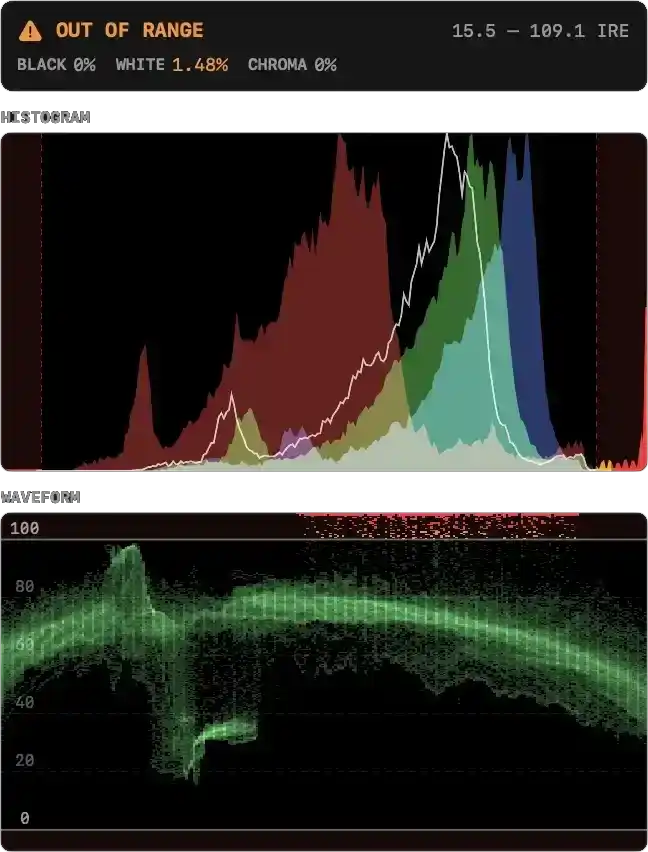
Compliance and Range Status
- Compliance Verdict: Warns when the active video frame contains samples that fall outside standard broadcast-legal thresholds, violating EBU R103-2000 specifications.
- Range Readout: Identifies the exact minimum and maximum luminance values present in the analyzed frame, expressed in IRE units.
- Excursion Percentages:
- Black Excursion: Measures the percentage of luminance samples falling below the legal black threshold (code 16).
- White Excursion: Monitors the percentage of luminance samples exceeding the legal white ceiling (code 235).
- Chroma Excursion: Displays the percentage of chrominance samples lying outside standard broadcast color gamut limits.
Histogram Analysis
- Signal Distribution Plots: Visualizes the relative volume of red, green, and blue color channels, alongside an overlaid white line plotting overall luminance across the 8-bit code value axis (0–255).
- Legal Boundary Guides: Vertical red lines mark the strict legal boundaries (code 16 for black, code 235 for white).
- Illegal Zone Shading: Shaded red background bands on the extreme left and right highlight forbidden footroom and headroom areas, revealing when signal peaks spill into prohibited regions.
Waveform Monitoring
- Luminance Mapping: Traces luminance intensity vertically across the horizontal width of the video frame, showing where bright and dark details are located.
- Graticule Reference Lines: Horizontal markers placed at 0, 20, 40, 60, 80, and 100 IRE provide reference thresholds for signal levels.
- Clipping Alarm Overlay: Red speckled patterns highlight the exact areas where the video signal clips or exceeds the 100 IRE maximum, pinpointing the horizontal position of overexposed highlights.
Trim
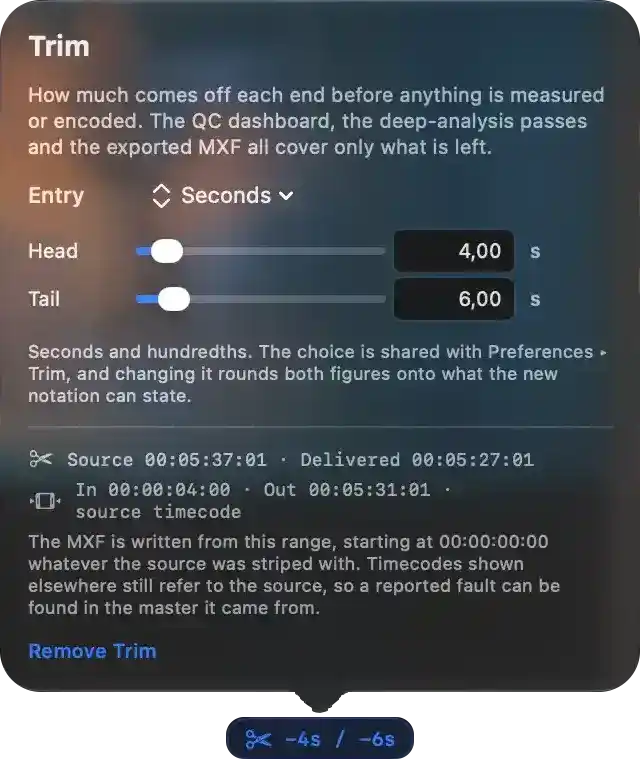
Defines how much material is removed from the beginning and end of the source before any measurement, deep analysis, or export. The QC dashboard and the delivered MXF describe only the retained programme.
- Entry — selects the notation used to state the trim: seconds and hundredths. Changing it rounds both amounts to what the new notation can express. The choice is shared with Preferences, so it acts as a house convention rather than a per-file setting.
- Head — amount removed from the start of the source. The delivered file begins after this point. Current value: 4.00 s.
- Tail — amount removed from the end of the source. The delivered file ends before this point. Current value: 6.00 s.
- Source and delivered duration — shows the original length 00:05:37:01 and the delivered length 00:05:27:01. The delivered programme is therefore 10 seconds shorter.
- In / Out timecodes — source-relative positions of the retained range: in at 00:00:04:00, out at 00:05:31:01. These positions stay tied to the source so a reported fault can be found in the original master.
- Delivery behaviour — the MXF is written from this range and starts at 00:00:00:00 regardless of the source’s own starting timecode. Timecodes shown elsewhere still refer to the source file.
- Remove Trim — clears both head and tail amounts and restores the full source to the delivery.
- Active trim summary — shows the current reduction as −4s / −6s while a trim is in force.
Deep Analysis
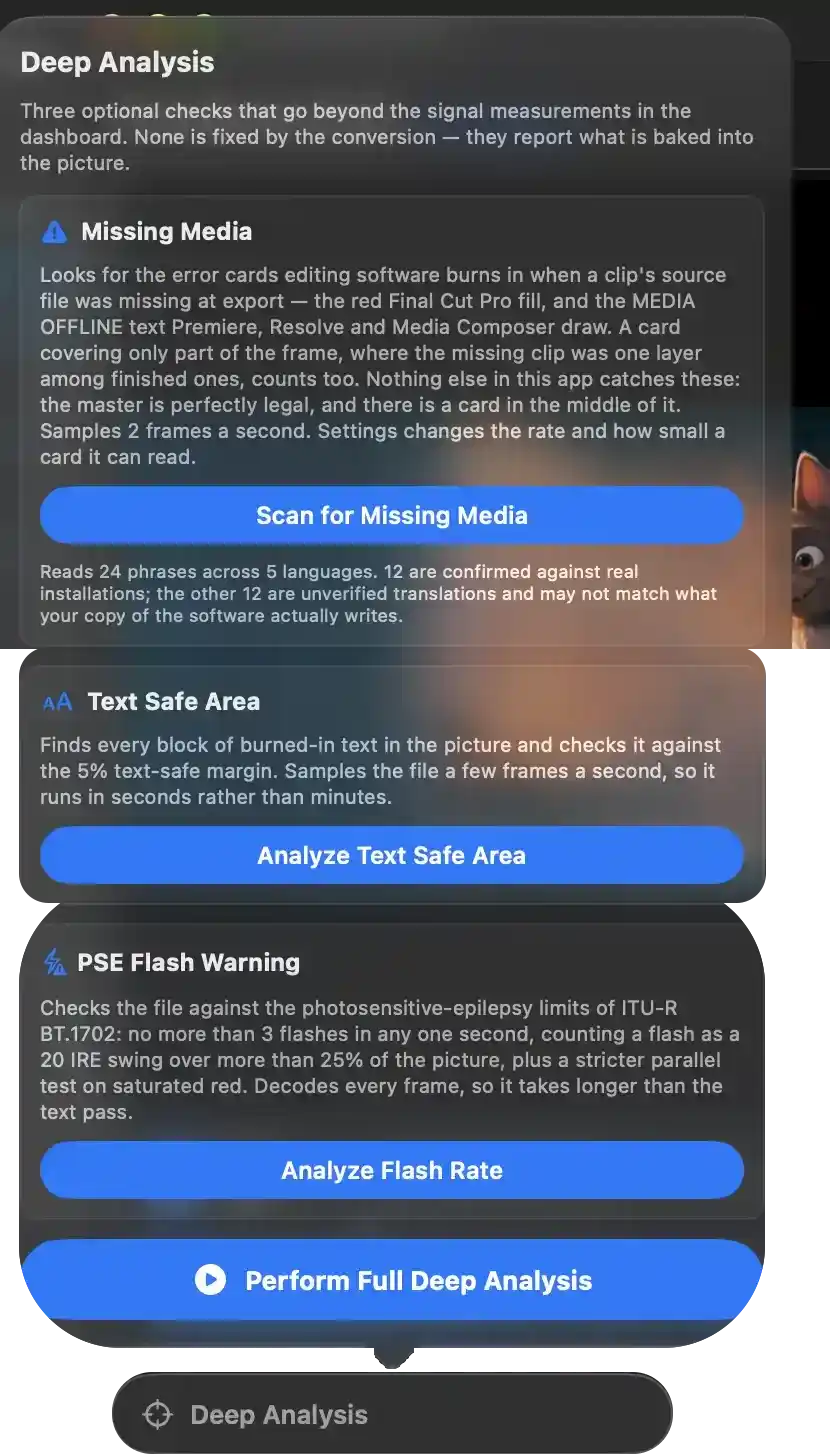
Optional pre-delivery checks that go beyond the signal measurements already on the QC dashboard. They inspect the picture of the loaded master for faults the conversion cannot fix — a missing-media card, burned-in text outside the safe margin, flash sequences over the photosensitive-epilepsy limit — and report them so the file can go back to the editing timeline. Each check is run by hand and each costs real time, so every one states what it looks for and what it will spend before offering to run.
Missing Media
- Looks for error cards the editing software burns in when a clip's source file was missing at export: the flat red Final Cut Pro fill, and the "MEDIA OFFLINE"-type text Premiere, Resolve and Media Composer draw. A card covering only part of the frame counts too, where the missing clip was one layer among finished ones.
- Reports the only fault of the three that makes a master undeliverable outright: the file can be perfectly legal in loudness, levels and frame rate and still carry a card in the middle of the programme.
- Samples two frames a second; the rate and the size the frames are read at are configurable, and both decide how small a card can still be recognised.
- Scan for Missing Media — starts the pass over the loaded file, restricted to the stretch the delivery will contain when a trim is set. Replaced by Scan Again once a result exists.
- Footnote: how many wordings the text half of the pass reads, how many languages they cover, and how many of them are confirmed against real installations versus unverified translations — an unverified wording produces no answer at all on a file that contains a card, so the distinction is stated rather than assumed.
Text Safe Area
- Finds every block of burned-in text in the picture and checks it against the 5% text-safe margin. Samples the file a few frames a second, so it runs in seconds rather than minutes.
- Analyze Text Safe Area — starts the pass over the loaded file. Replaced by Analyze Again once a result exists.
PSE Flash Warning
- Checks the file against the photosensitive-epilepsy limits of ITU-R BT.1702: no more than three flashes in any one second, counting a flash as a 20 IRE swing over more than 25% of the picture, plus a stricter parallel test on saturated red.
- Decodes every frame, so it takes longer than the text pass.
- Analyze Flash Rate — starts the pass over the loaded file. Replaced by Analyze Again once a result exists.
Run everything
- Perform Full Deep Analysis — starts every check that still has something to do on this file, as independent passes reporting their own progress. Its label counts what pressing it will actually start ("Run 2 Remaining Checks"), reads "Analysis Running…" while any check is in progress, and reads "Nothing Left to Analyze" once all three have run.
- A check already running is left alone rather than restarted, and a check that came back clean is treated as spent on this file: its own action greys out and the control stays inert until a different file is loaded.
- A check that produced findings offers a link into the list of passages, where each finding can be reviewed frame by frame or marked ignored so it stops counting against that verdict.
Settings
Settings
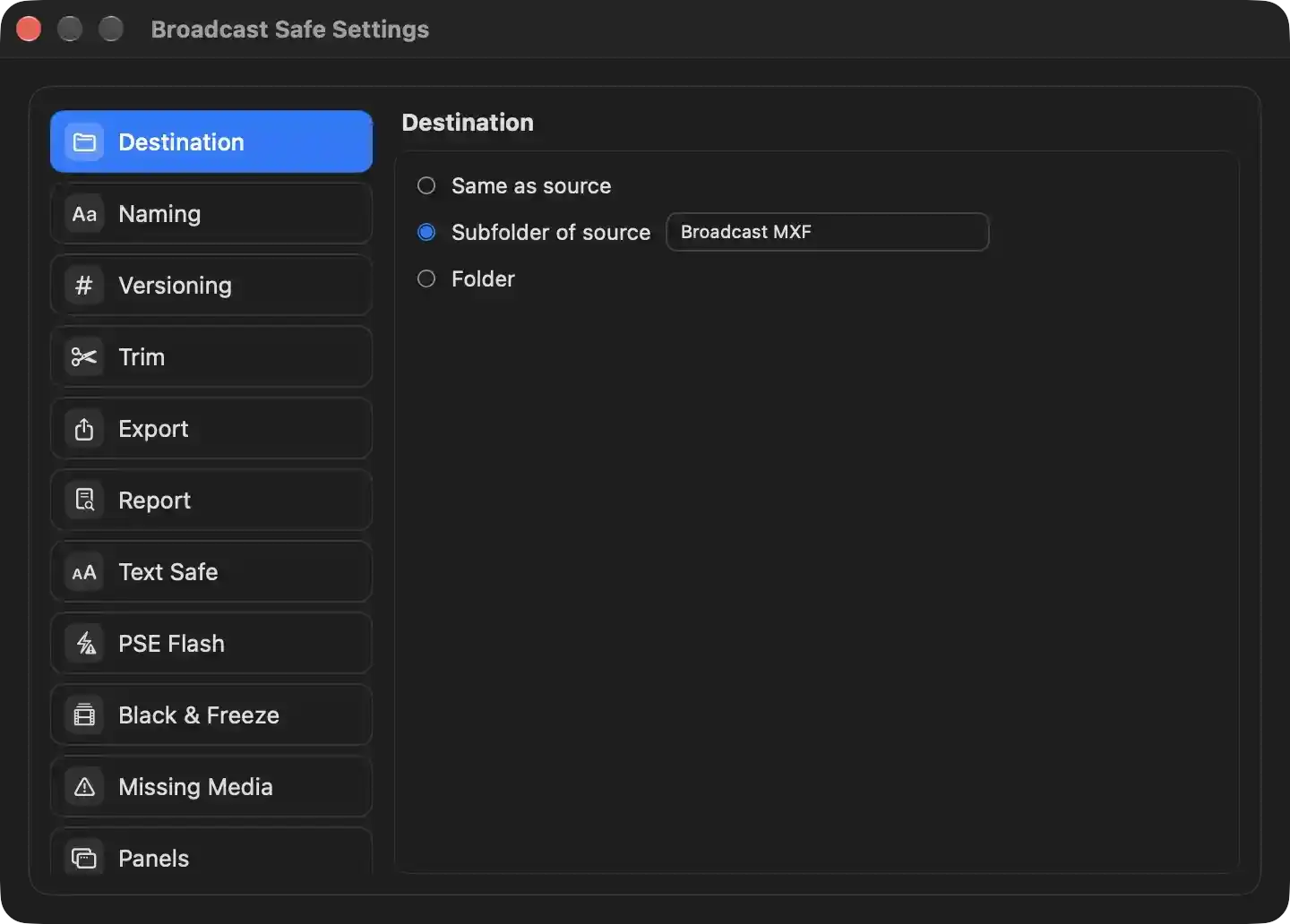
Defines where the broadcast-compliant MXF is written relative to the source master. The choice applies to every subsequent export and is persisted immediately.
- Same as source — the delivered MXF is written into the same folder as the dropped source file. No additional location needs to be supplied.
- Subfolder of source — the delivered MXF is written into a named subfolder inside the source file's own folder. The subfolder is created automatically if it does not exist; if it cannot be created, the export falls back to the source's folder.
- Broadcast MXF — name of the subfolder created beside the source. Editing it changes the folder name used for every future export.
- Folder — the delivered MXF is written into one fixed folder, chosen once and reused for every delivery regardless of where the source files live.
Impact from the operator's perspective: this setting determines only the destination path. Filenames, versioning on collision, and the source file itself are unaffected, and an output path resolving to the source file is never used — it falls back to a numbered name instead.
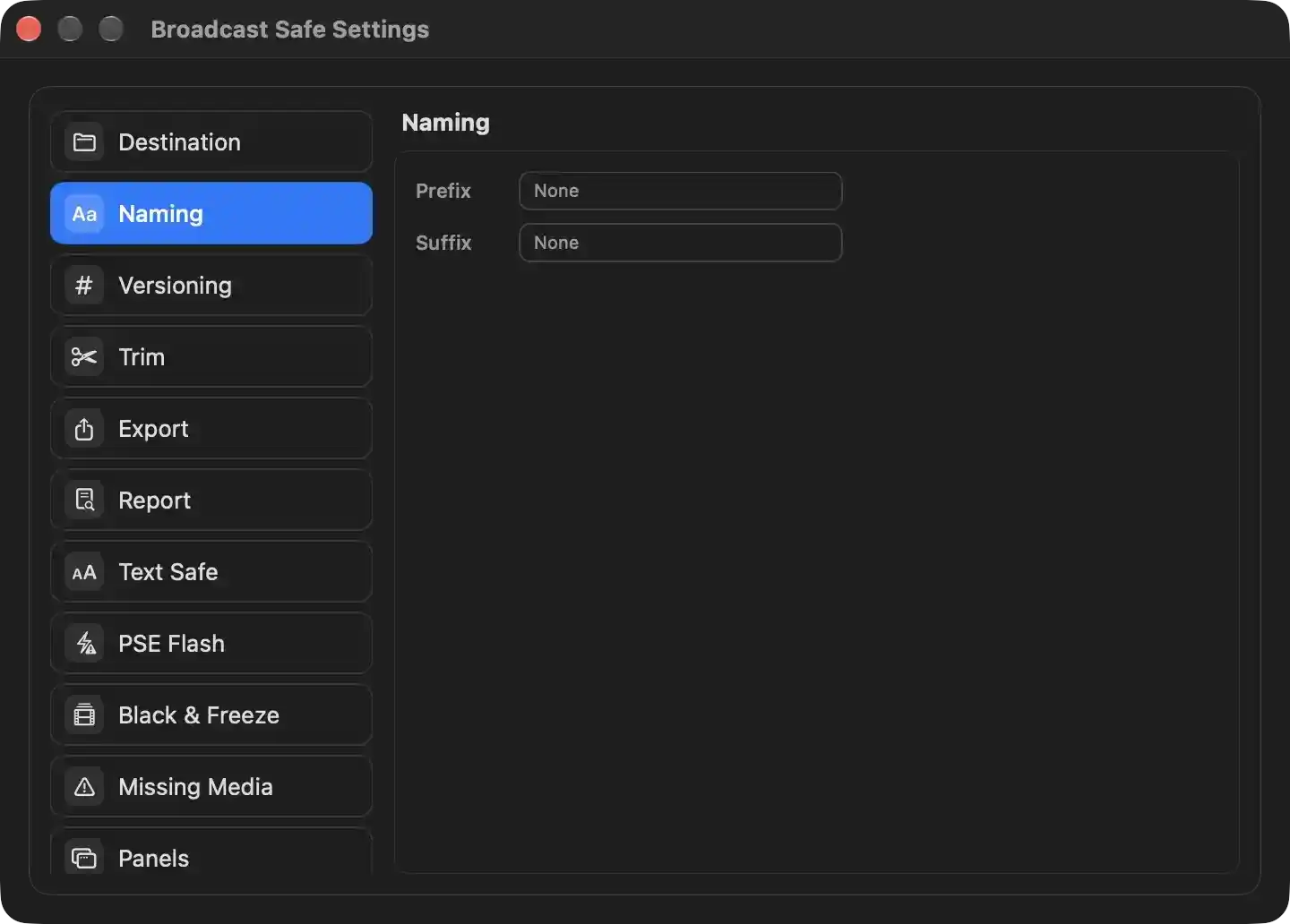
Defines the house convention applied to the filename of every exported MXF, so a delivered file can be identified by name without opening it. Both entries decorate the source clip's base name; the original name is always preserved between them.
- Prefix — text placed immediately before the source clip's base name. A value such as a station code or delivery tag makes exported files sort and filter together in the destination folder. Leaving it empty adds nothing ahead of the name.
- Suffix — text placed immediately after the source clip's base name and before any collision-avoidance numbering. Used for markers such as a version label, a date stamp, or a delivery qualifier. Leaving it empty adds nothing after the name.
The two settings are consulted when the destination path for the finished MXF is built; changing either affects only files exported from that point on and never renames anything already written.
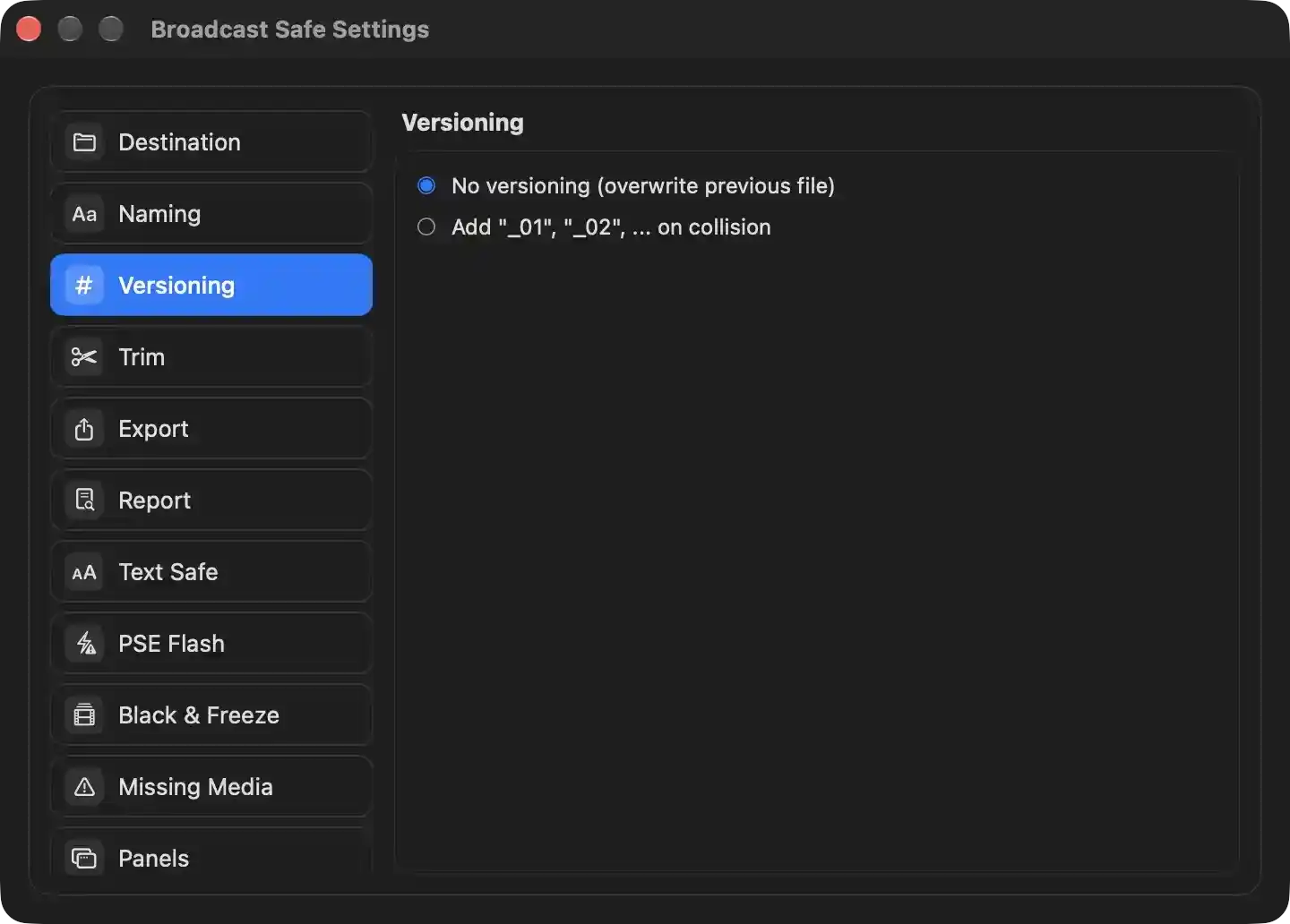
Determines how the application resolves a situation where the computed delivery filename already exists at the destination folder. This is a house-wide policy choice that applies to every MXF export, deciding whether an earlier export of the same name is disposable or must be preserved alongside the new one. The setting affects only the naming of the written file and never the encoding, the trim, or the audio and video targets.
- No versioning (overwrite previous file) — An existing file at the computed destination is replaced by the new export. This keeps the delivery folder to a single file per source name. Its one safeguard is that the source master itself can never be overwritten: because the file importer accepts MXF, an output that would resolve to the input path falls back to a numbered name instead, so a conversion cannot truncate the file it is reading from.
- Add "_01", "_02", … on collision — A numbered suffix is appended to the base name and incremented until an unused name is found. This preserves earlier exports rather than discarding them, so a previous delivery remains on disk for comparison or re-sending. It is the setting that guarantees no prior export can be silently destroyed by a new conversion.
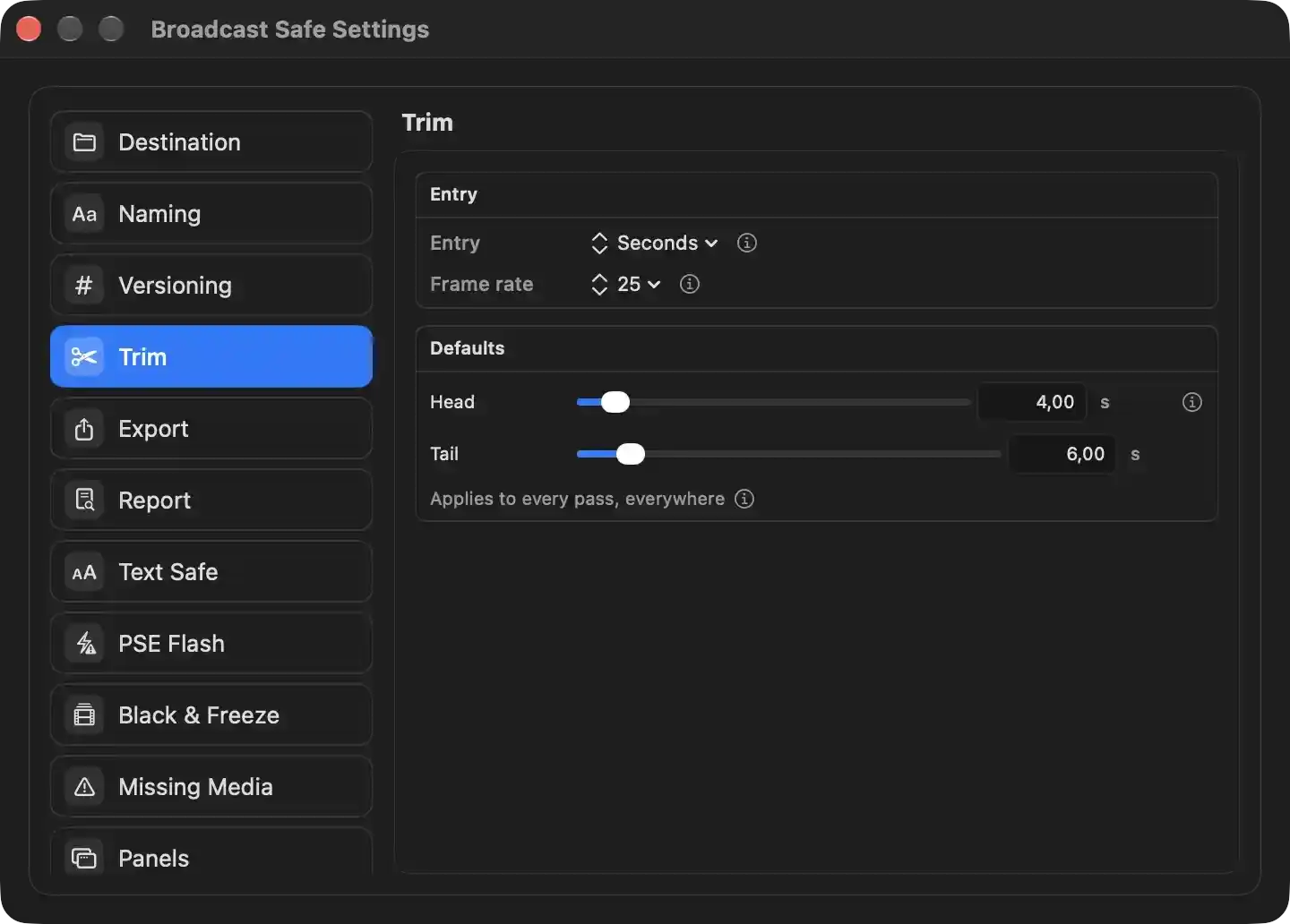
The Trim panel defines the default head and tail amounts proposed when a master is loaded, how those amounts are written and entered, and the fallback frame rate used before a file’s own rate is measured. These defaults are applied to every analysis pass and to the exported MXF; the per-file trim can still be adjusted after loading.
- Entry: Determines whether trim values are expressed as decimal seconds, whole seconds, or timecode. Changing it also rounds stored default trim figures onto what the new notation can express.
- Frame rate: Sets the reference rate used to count frames for timecode trim when no measured rate exists. Once a file is analysed, its own rate replaces this reference.
- Head: Sets the default number of seconds removed from the start of every newly loaded file. The per-file trim starts at this value and can then be adjusted.
- Tail: Sets the default number of seconds removed from the end of every newly loaded file.
- Applies to every pass, everywhere: Indicates these defaults affect all analysis and conversion operations, not just the final export.
Information affordances beside each item explain the behaviour in more detail.
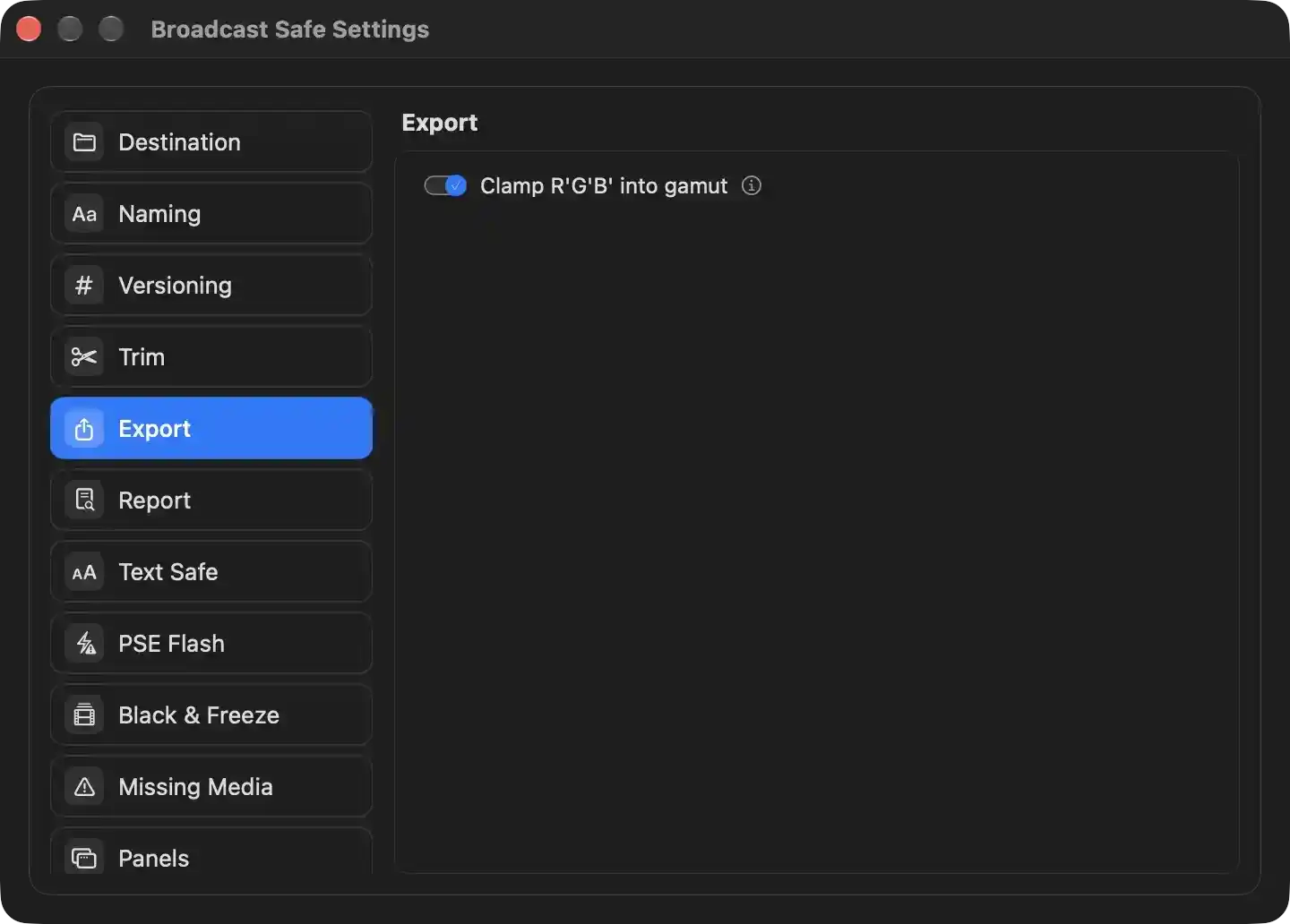
Controls how the converted MXF is finalized during export.
- Clamp R'G'B' into gamut — Determines whether the encode routes the picture through a full-range R'G'B' round trip so that any reconstructed component lying outside the preferred component range is pulled back inside before the video is returned to Y'Cb/Cr. When enabled, saturated colours that reconstruct to values the scopes flag as out of gamut are clamped; because the round trip resamples chroma, in-gamut material can be altered slightly as well, which is why it is off by default and left to the operator's judgement. The setting is consulted at the moment an encode starts and its outcome is recorded against the finished delivery so the QC report can state which way it went.
- Information — Explains the trade-off behind the gamut clamp so the operator can decide whether the chroma resampling it introduces is acceptable for the master at hand.
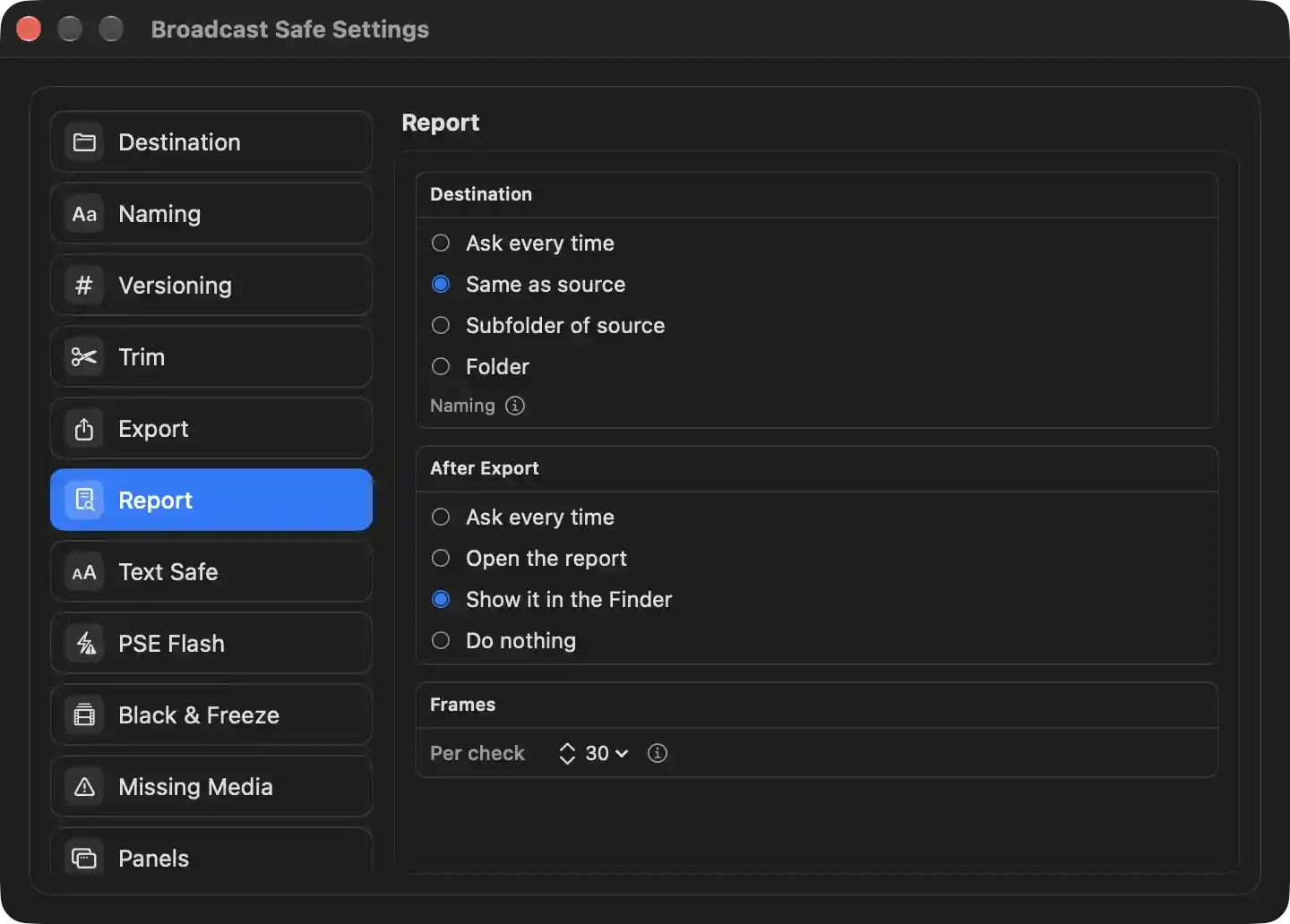
Configures where an exported QC report PDF is written, what happens immediately after it is written, and how many findings are illustrated with a frame grab in the report.
- Destination — selects the folder the QC report PDF is written to. It is deliberately independent of where the converted MXF goes, because the report and the delivery usually travel to different people.
- Ask every time — presents a standard save panel on each export, proposing the source's folder and a name derived from the source file. Chosen by default so the first few exports show the operator what a report looks like before automation is enabled.
- Same as source — writes the report beside the source file without prompting. Currently selected.
- Subfolder of source — writes the report into a named subfolder inside the source's folder, created on demand if it does not exist.
- Folder — writes the report into a fixed folder chosen once and reused for every report.
- Naming — reveals an explanation of how the report file is named when it is written without a save panel, and that existing reports are never overwritten outside the save panel.
- After Export — selects what happens the moment the report has been written to disk.
- Ask every time — presents an alert offering to open the report or show it in the Finder.
- Open the report — opens the finished PDF in the app's own preview window, which can hand it on to the system's default PDF viewer.
- Show it in the Finder — selects the report in a Finder window so it can be dragged to its destination. Currently selected.
- Do nothing — writes the file silently and carries on, for a house whose downstream workflow already collects the report.
- Frames — controls how heavily the report is illustrated.
- Per check — the maximum number of findings from each check that are given a captured frame in the PDF (currently 30). Each capture is a seek and a decode, so the limit keeps a master carrying dozens of findings from turning the report into a near-identical picture sequence; findings beyond the limit are still listed with their timecodes in a compact table. Setting it to zero captures every finding.
- An explanatory note beside the value states the meaning of the figure and the effect of removing the limit.
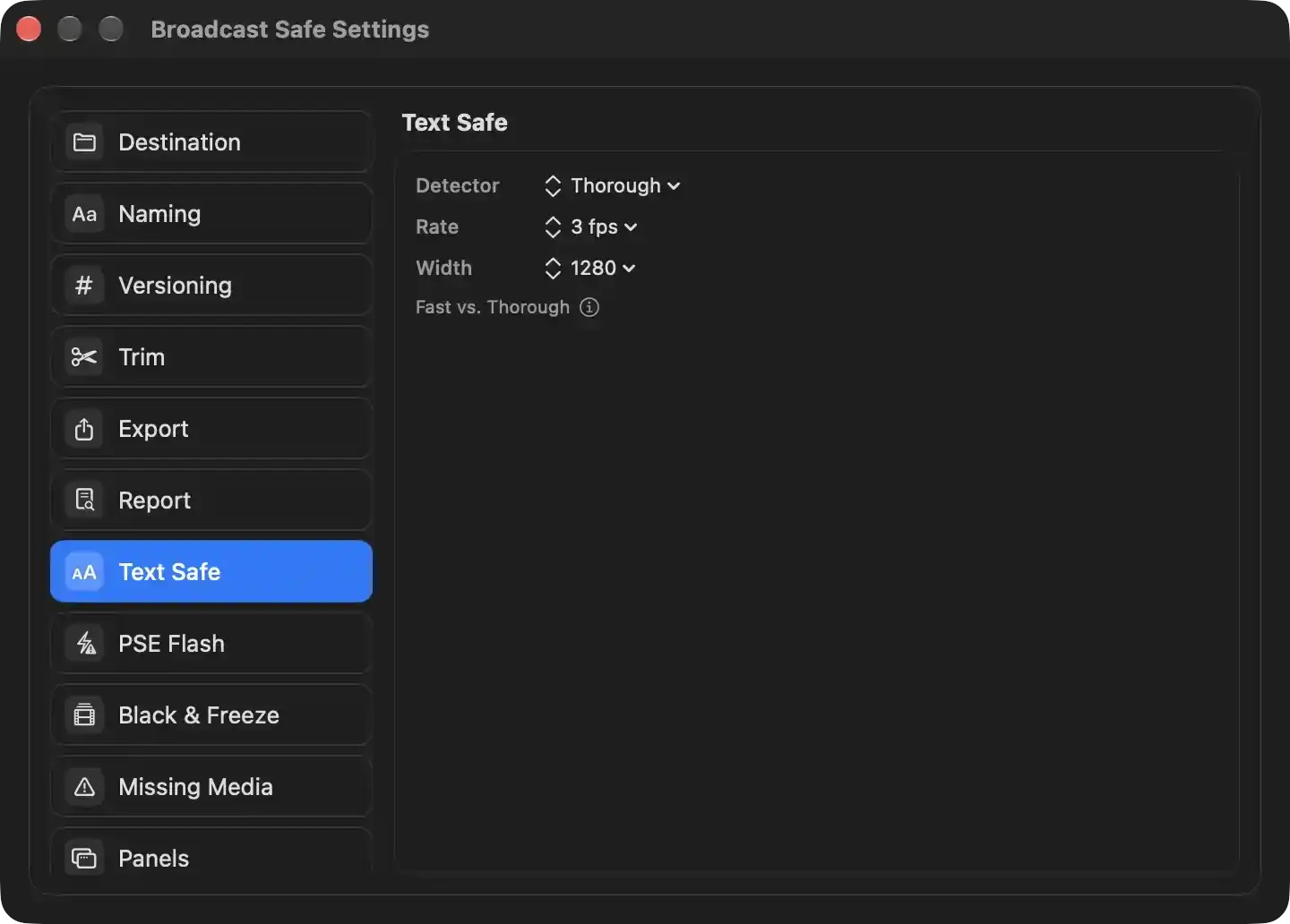
This pane configures how the optional Text Safe deep-analysis pass finds burned-in text and checks it against the 5% text-safe margin. Changes apply to future Text Safe analyses and persist automatically.
- Detector: chooses the text-finding strategy. Thorough performs full text recognition, catching captions, disclaimers, and small or low-contrast text even over busy artwork, but is much slower. Fast locates text shapes only, runs significantly faster, but may miss captions and disclaimers over busy or low-contrast areas. Impact: thoroughness trades analysis speed for fewer missed text blocks.
- Rate: sets how many frames per second are sampled for text detection. 3 fps examines three frames per second; All examines every frame. Higher rates catch very brief text but increase analysis time; lower rates shorten the pass but may skip text that appears briefly. Because on-screen text usually remains legible for about a second, the default is normally sufficient.
- Width: sets the pixel width frames are reduced to before text detection. 1280 scales the picture to 1280 pixels wide; Native leaves the original frame size. Larger or native widths help detect smaller text but cost more processing; smaller widths speed analysis but may miss small or thin text.
- Fast vs. Thorough: explains the tradeoff between the two detector modes, including when the faster mode is adequate and when the slower, more accurate mode is needed.
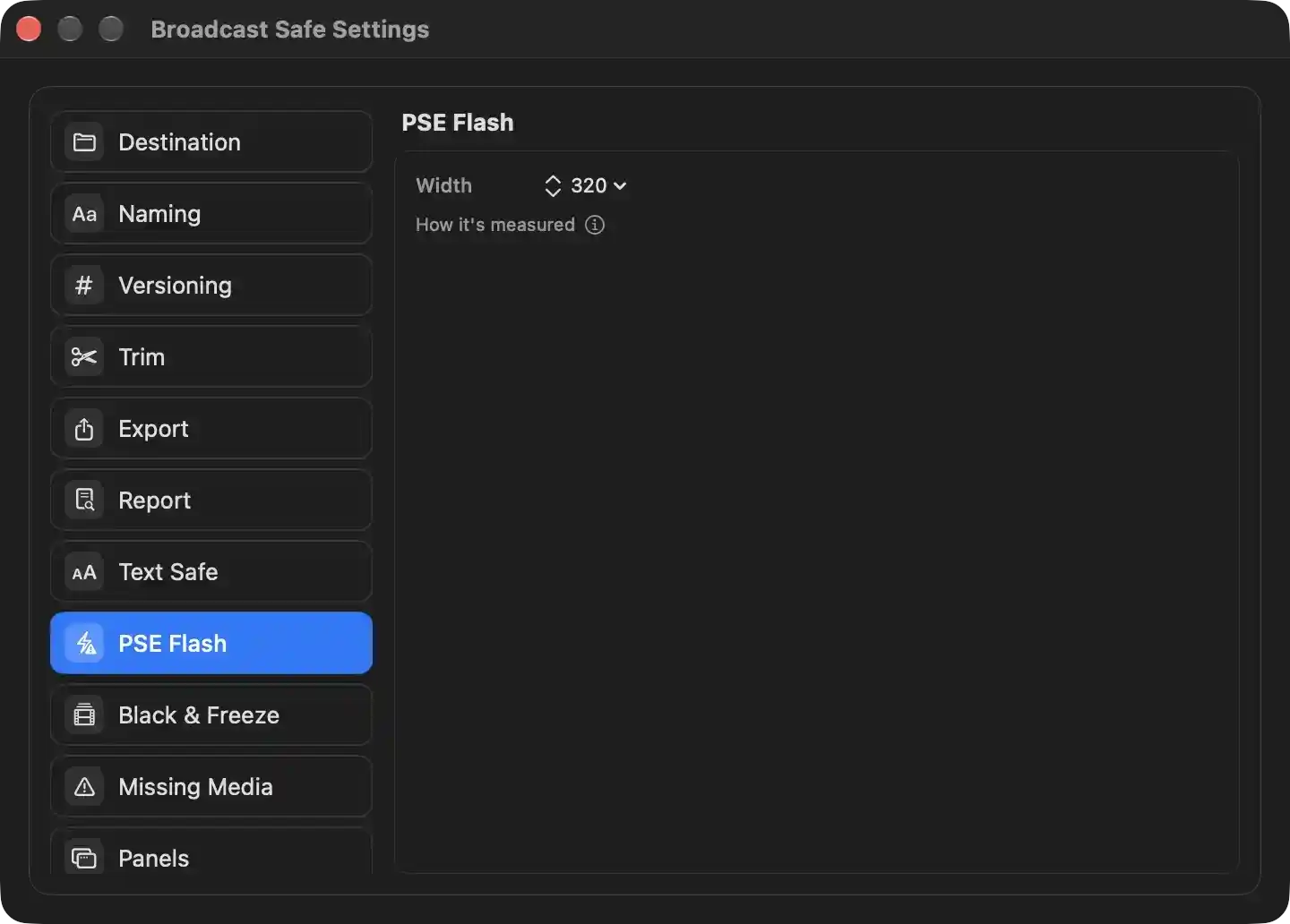
Configures how the photosensitive-epilepsy (flash) check reads the picture when measuring flash rates against ITU‑R BT.1702.
- Width — the horizontal resolution each frame is reduced to before consecutive frames are compared. A lower figure analyses more frames per second at the cost of precision on small flashing areas; a higher figure resolves smaller flashes but slows the pass. The default of 320 keeps the pass fast because the check only needs the proportion of the picture that changed, which survives downscaling.
- How it's measured — reveals the methodology behind the flash verdict: what qualifies as a transition, the luminance swing and affected-area thresholds, the stricter saturated-red test, and the one-second window the flash count is evaluated over.
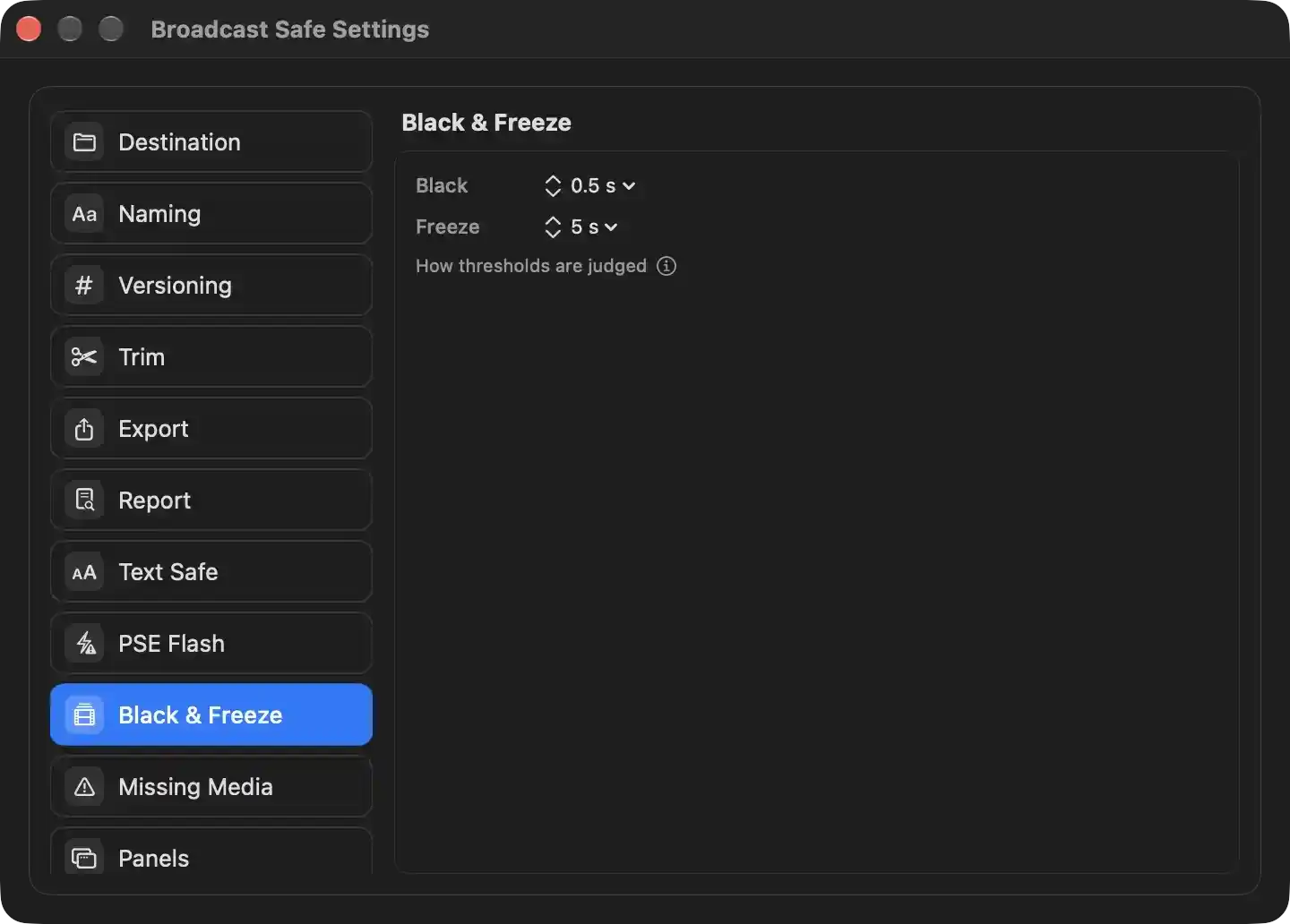
Controls how long a stretch of black picture or a frozen picture must last before the QC dashboard flags it as a continuity fault. Both are reporting thresholds applied to passages already recorded during analysis, so changing either immediately re-judges the file currently loaded instead of requiring it to be measured again. Head and tail black are treated as programme material and never counted as faults, and a freeze that is also black is reported once, as black, rather than twice.
- Black — sets the minimum duration of an interior black passage that is reported as a finding. Values are 0.2 s, 0.5 s, 1 s and 2 s; 0.5 s is the default, chosen so isolated black frames from decoding or compositing are ignored while a genuine hole in the middle of a cut sequence is reported. Raising it makes the check tolerant of longer deliberate black; lowering it makes it stricter.
- Freeze — sets the minimum duration of a held, unchanging picture that is reported as a finding. Values are 3 s, 5 s, 10 s and 15 s; 5 s is the default, deliberately above the length of packshots, held end titles and legal cards that are ordinary in a commercial, and below what a failed render produces. Raising it stops ordinary held frames from being reported; lowering it catches shorter stalls.
- How thresholds are judged — explains that these durations are reporting thresholds rather than detection limits: every black and frozen passage in the file is recorded during analysis regardless of these values, and the numbers here only decide which of those passages the dashboard and the QC report present as findings.
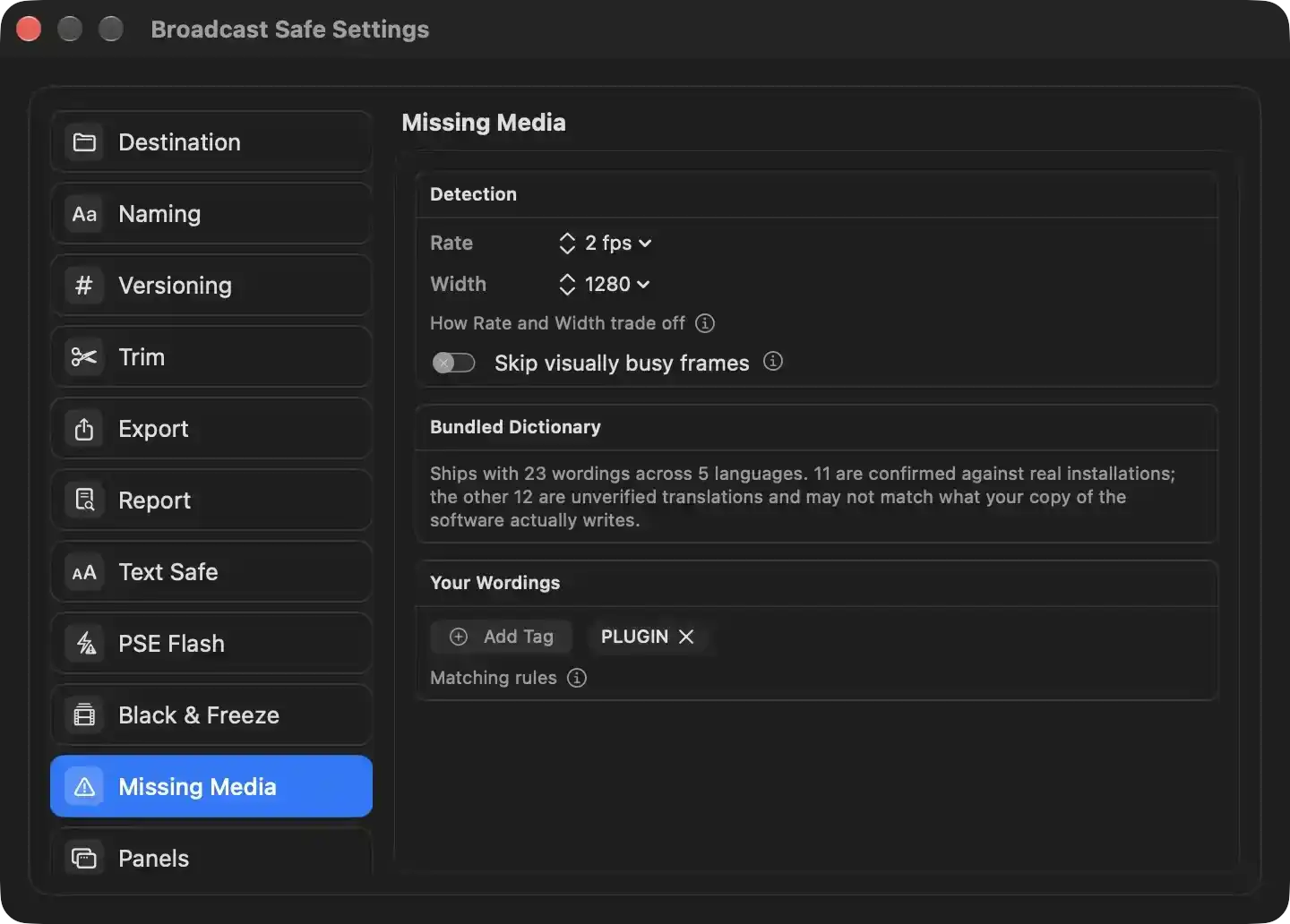
Configures how the missing-media pass scans a master for editor error cards burned into the picture, and which wordings it matches against. Findings feed the Offline Media verdict on the QC dashboard and the Violations panel.
Detection
- Rate — how many frames per second the pass measures. A card lasts as long as the clip that should have been there, so 2 fps finds anything an editor would have noticed missing; a higher count costs proportionally more decode time and is used when hunting something briefer than that.
- Width — the pixel width frames are scaled to before the text test reads them. This figure decides how small a card the recognizer can still resolve: 640 suits a feature scan while a smaller on-screen card needs 1280 or 1920, and Native leaves the picture at its own size. Raising it costs more per frame.
- How Rate and Width trade off — reveals an explanation of the two figures' cost and reach against each other.
- Skip visually busy frames — withholds frames that contain no flat area from the text test. Off by factory, because the flatness measure covers the whole frame and a card occupying only part of a photographed picture reads as busy and is therefore never examined. Worth turning on for long-form material whose cards fill the frame, where it is a genuine saving. Its adjacent note explains the trade-off.
Bundled Dictionary
- Reports the coverage the pass ships with: 23 wordings across 5 languages, of which 11 have been read off real installations and 12 are unverified translations that may not match what a given copy of the software writes. An unverified entry does not produce a wrong answer an operator can argue with — it produces silence on a file that contains a card — so the split is stated rather than assumed.
Your Wordings
- Add Tag — adds a wording the editor burns in locally, for a localisation, a house build or a version newer than the shipped list. Each entry is folded to the form the matcher compares, must be long enough to be meaningful, and is deduplicated against the bundled list.
- PLUGIN (removable) — one added wording, carried in the list; removing it stops the pass looking for it. Entries sit alongside the shipped dictionary and are marked as operator-added rather than app-supported.
- Matching rules — reveals how a wording is compared against what the recognizer reads, including case folding and whitespace collapsing.
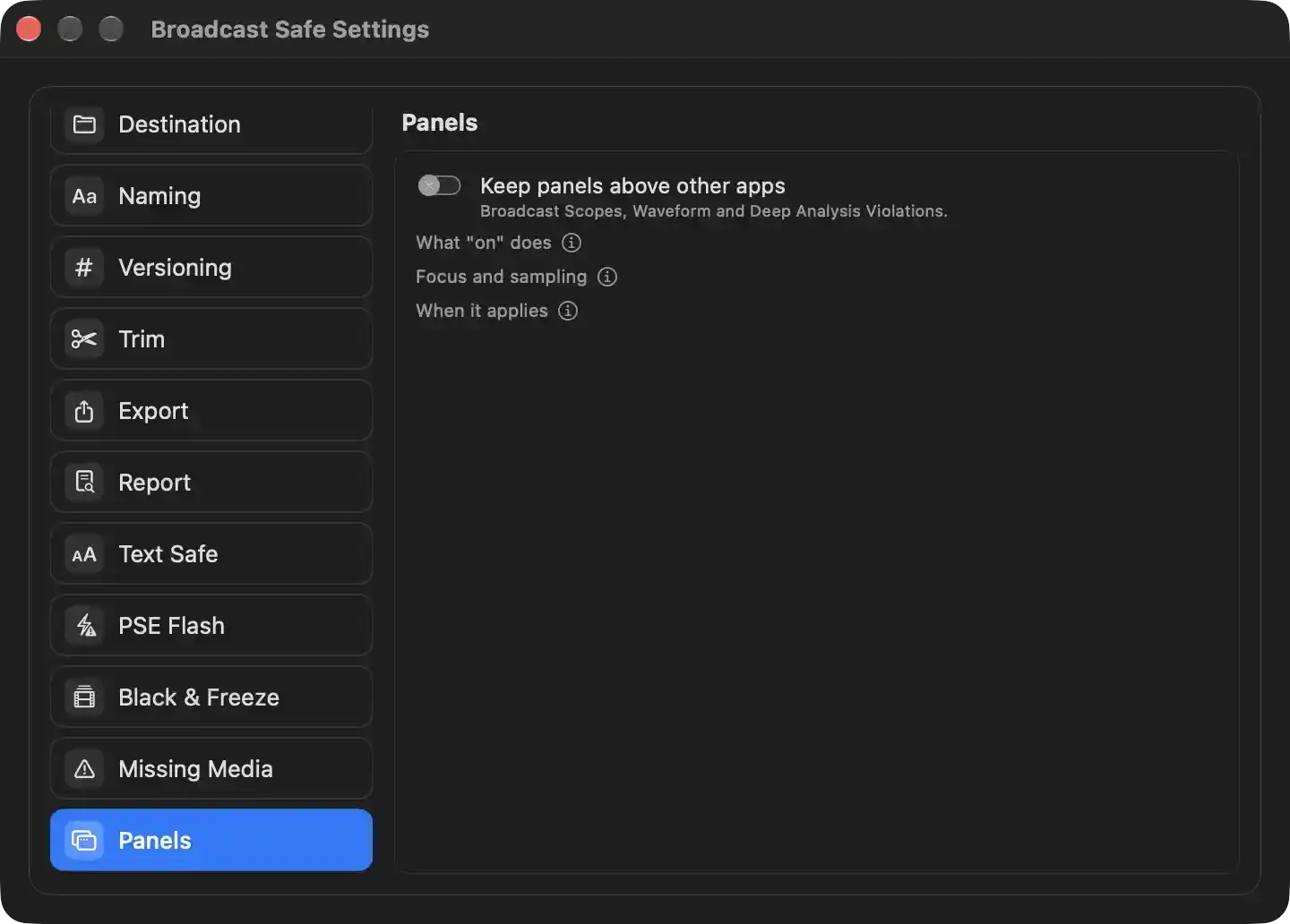
- Keep panels above other apps — Sets the window level for Broadcast Scopes, Waveform, and Deep Analysis Violations. When enabled, these utility panels remain above the windows of other applications. When disabled, they behave as ordinary windows and can be obscured by other windows. The setting takes effect immediately for all three panels.
- What "on" does — Explains the behavior of the enabled state, including that the named utility panels are kept above other applications.
- Focus and sampling — Explains how the preference affects focus and sampling for the utility panels.
- When it applies — Explains when the preference takes effect, including that open panels adopt the new level without restarting the application.
Report
PDF Report
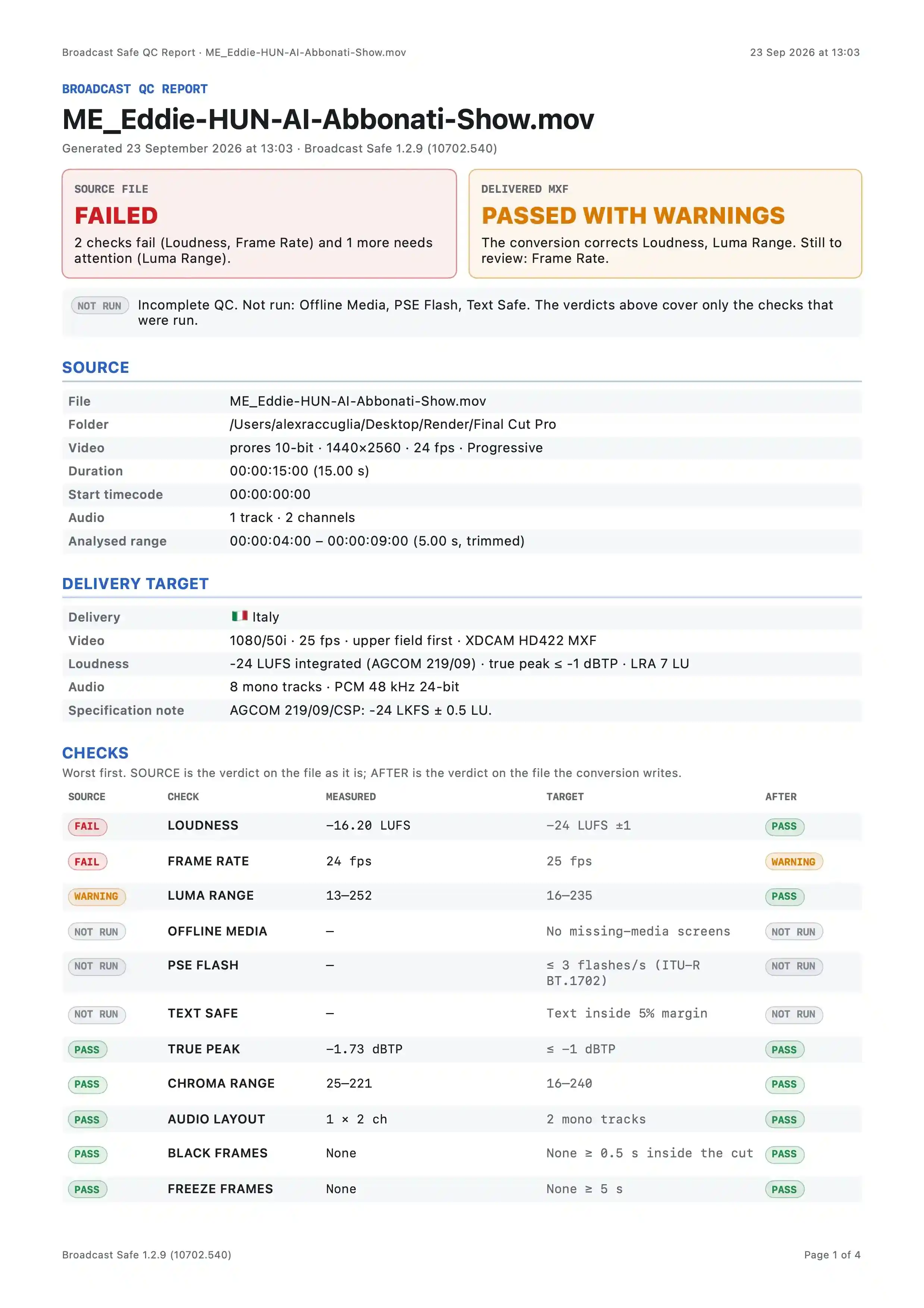
The panel is a read-only quality-control record of a source master and its intended broadcast delivery. It states whether the source passes, what the conversion will correct, what still needs review, and which optional checks were not run.
- Report heading: identifies the source file, the generation timestamp, and the app version that produced the report.
- Source verdict: overall source compliance. A failing state lists the checks that failed or need attention, indicating the master is not deliverable as-is.
- Delivered verdict: expected compliance after conversion. It names the checks the conversion corrects and the checks still requiring manual review.
- Incomplete-check notice: states that the QC is incomplete because certain deep checks were not run, and clarifies that the verdicts above cover only the checks that were run.
- Source summary: metadata measured from the source file.
- File name: the loaded master being assessed.
- Folder: location of the source file.
- Video: codec, resolution, frame rate, and scan type.
- Duration: total running time.
- Start timecode: source timecode at the file head.
- Audio: track count and channel count.
- Analysed range: the portion of the source actually measured, when a trim is applied.
- Delivery target summary: the selected broadcast specification against which the source is judged.
- Delivery: territory or preset name.
- Video: target standard, frame rate, field order, and delivery format.
- Loudness: target integrated loudness, true-peak ceiling, loudness range, and the applicable loudness standard.
- Audio: target track configuration and sample format.
- Specification note: any caveat or exact published figure attached to the chosen delivery.
- Checks summary: each row compares the measured source value against the delivery target and shows the expected result after conversion. The checks are ordered worst first.
- Loudness: measured integrated loudness against the target; source failure is corrected by conversion.
- Frame rate: measured source rate against the target rate; conversion changes it, but the result still requires review.
- Luma range: measured minimum and maximum luma against the legal range; source warning is corrected by conversion.
- Offline media: missing-media card check; not run, so no verdict is available.
- PSE flash: photosensitive-epilepsy flash-rate check; not run, so no verdict is available.
- Text safe: burned-in text margin check; not run, so no verdict is available.
- True peak: measured true peak against the ceiling; passes before and after conversion.
- Chroma range: measured chroma range against the legal range; passes before and after conversion.
- Audio layout: measured channel configuration against the required track layout; passes before and after conversion.
- Black frames: interior black-passage check; passes before and after conversion.
- Freeze frames: frozen-picture check; passes before and after conversion.
- Footer: identifies the generating build and the page position within the report.
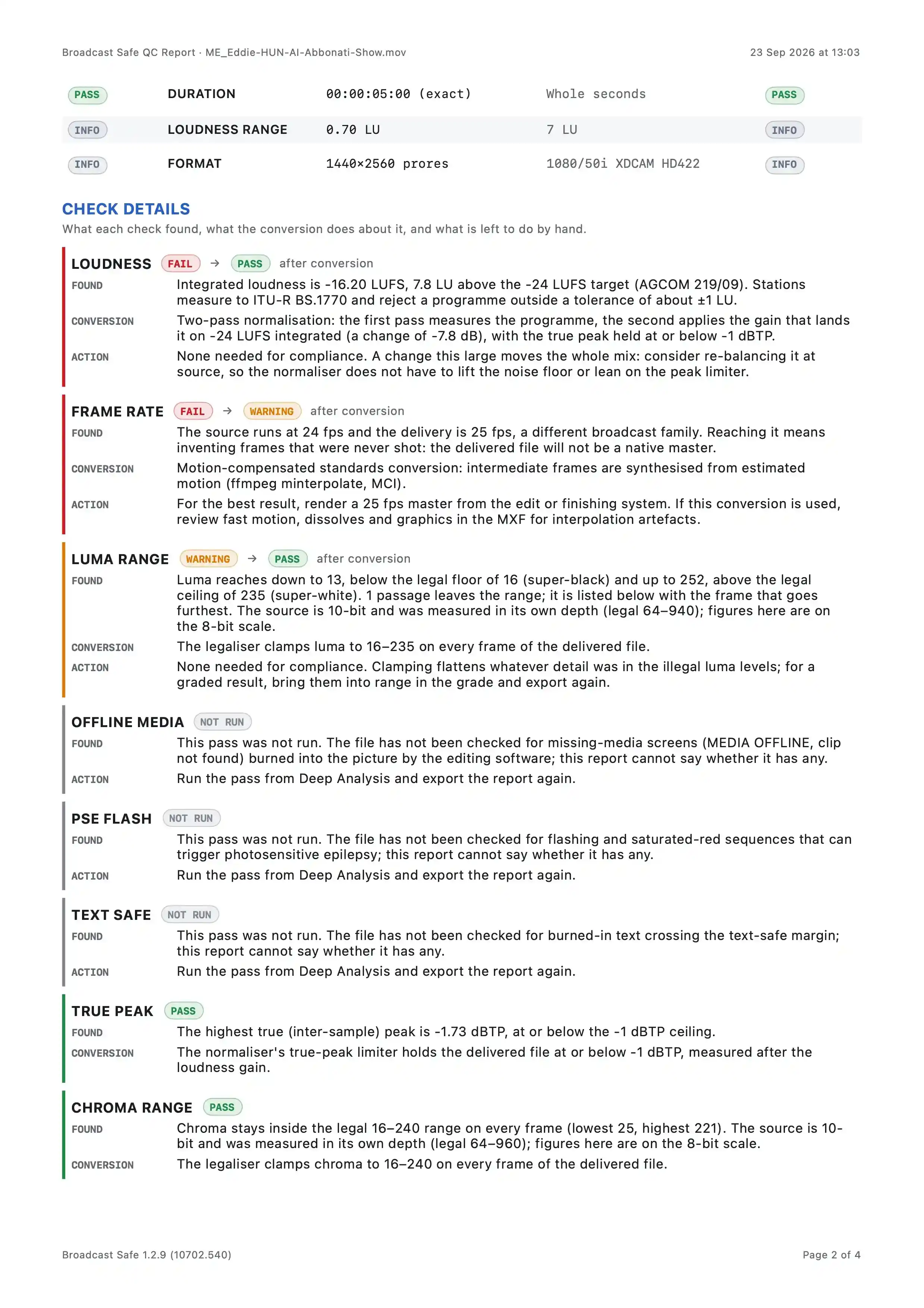
This page reports how the loaded source measures against the selected delivery specification and what the conversion changes. The upper table summarises duration, loudness range, and format. The lower section explains each evaluated check in detail. Status badges appear before and after an arrow: the left badge is the source verdict, the right badge is the projected or actual delivered-file verdict.
- Duration — PASS to PASS. The source and delivered length are exactly 00:00:05:00, on a whole-second boundary.
- Loudness Range — INFO to INFO. The measured range is 0.70 LU against a 7 LU target. This is informational and not judged pass/fail.
- Format — INFO to INFO. The source is 1440×2560 ProRes; the delivery target is 1080/50i XDCAM HD422. This is informational.
Check Details
- Loudness — FAIL to PASS after conversion. Found integrated loudness of −16.20 LUFS, 7.8 LU above the −24 LUFS AGCOM target. Conversion applies two-pass normalisation targeting −24 LUFS with true peak held at or below −1 dBTP. Action: none for compliance; consider rebalancing the source mix.
- Frame Rate — FAIL to WARNING after conversion. Found 24 fps source against 25 fps delivery, a different broadcast family, so the delivered file will not be a native master. Conversion uses motion-compensated standards conversion. Action: recut at 25 fps for the best result; review fast motion, dissolves, and graphics for interpolation artefacts.
- Luma Range — WARNING to PASS after conversion. Found luma reaching 13 and 252, below the legal floor of 16 and above the legal ceiling of 235; one passage leaves the range. The source is 10-bit, measured in its own depth, with figures shown on the 8-bit scale. Conversion clamps luma to 16–235 on every delivered frame. Action: none for compliance; for a graded result, bring levels into range in the grade.
- Offline Media — NOT RUN. The file has not been checked for missing-media screens burned into the picture. Action: run the pass from Deep Analysis and export the report again.
- PSE Flash — NOT RUN. The file has not been checked for flashing and saturated-red sequences that can trigger photosensitive epilepsy. Action: run the pass from Deep Analysis and export the report again.
- Text Safe — NOT RUN. The file has not been checked for burned-in text crossing the text-safe margin. Action: run the pass from Deep Analysis and export the report again.
- True Peak — PASS. The highest true peak is −1.73 dBTP, at or below the −1 dBTP ceiling. Conversion’s true-peak limiter holds the delivered file at or below −1 dBTP. No action needed.
- Chroma Range — PASS. Chroma stays inside the legal 16–240 range on every frame, with lowest 25 and highest 221. Conversion clamps chroma to 16–240 on every delivered frame. No action needed.
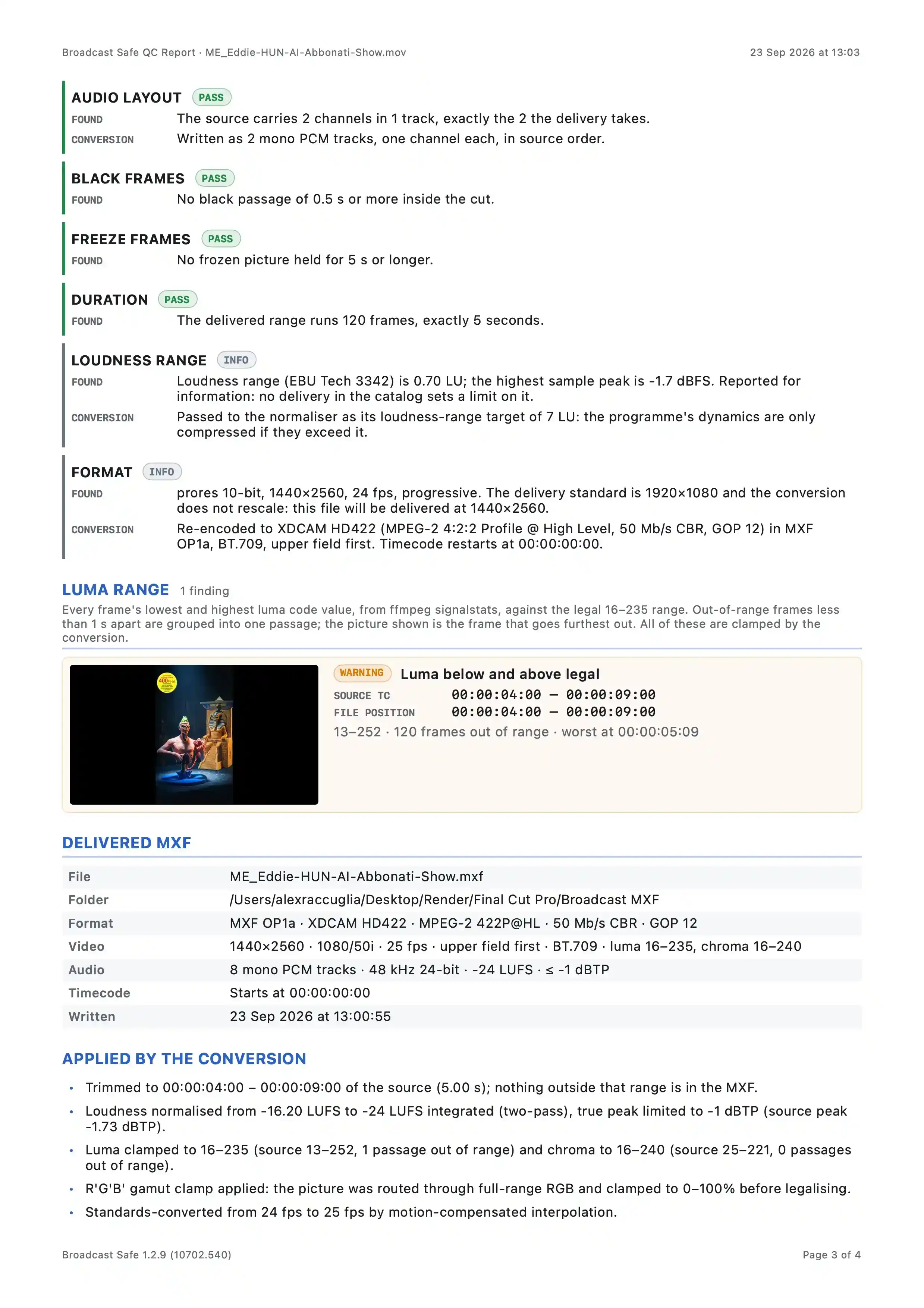
This page reports the QC outcome for the converted master. It lists each compliance check with its measured status, details the luma-range finding, documents the delivered MXF, and summarizes the corrections applied during conversion.
- Report header — Identifies the report and the source file it describes, with the generation date shown at the top right.
- Audio Layout — PASS. The source carries 2 channels in 1 track, exactly what the delivery takes. The conversion writes them as 2 mono PCM tracks, one channel each, in source order.
- Black Frames — PASS. No black passage of 0.5 s or more inside the cut.
- Freeze Frames — PASS. No frozen picture held for 5 s or longer.
- Duration — PASS. The delivered range runs 120 frames, exactly 5 seconds.
- Loudness Range — INFO. Measured loudness range is 0.70 LU; highest sample peak is −1.7 dBFS. Reported for information because no delivery in the catalog sets a limit on it. The conversion passes it to the normaliser as the loudness-range target of 7 LU, so programme dynamics are only compressed if they exceed that.
- Format — INFO. Source is ProRes 10-bit, 1440×2560, 24 fps, progressive. The delivery standard is 1920×1080 and the conversion does not rescale, so the file is delivered at 1440×2560. Re-encoded to XDCAM HD422 (MPEG-2 4:2:2 Profile @ High Level, 50 Mb/s CBR, GOP 12) in MXF OP1a, BT.709, upper field first. Timecode restarts at 00:00:00:00.
- Luma Range finding — One finding. Every frame’s lowest and highest luma code value is compared against the legal 16–235 range. Out-of-range frames less than 1 s apart are grouped into one passage; the picture shown is the frame that goes furthest out. All are clamped by the conversion.
- Warning badge: Luma below and above legal.
- Source timecode: 00:00:04:00 – 00:00:09:00.
- File position: 00:00:04:00 – 00:00:09:00.
- Measured range: 13–252.
- 120 frames out of range; worst at 00:00:05:09.
- Thumbnail shows the offending frame with a text-safe overlay.
- Delivered MXF — Documents the file produced by the conversion.
- File: output MXF filename.
- Folder: full destination path.
- Format: MXF OP1a · XDCAM HD422 · MPEG-2 422P@HL · 50 Mb/s CBR · GOP 12.
- Video: 1440×2560 · 1080/50i · 25 fps · upper field first · BT.709 · luma 16–235, chroma 16–240.
- Audio: 8 mono PCM tracks · 48 kHz 24-bit · −24 LUFS · ≤ −1 dBTP.
- Timecode: starts at 00:00:00:00.
- Written: timestamp when the MXF was completed.
- Applied by the Conversion — Lists the changes the conversion made to the source.
- Trimmed to 00:00:04:00 – 00:00:09:00 of the source (5.00 s); nothing outside that range is in the MXF.
- Loudness normalised from −16.20 LUFS to −24 LUFS integrated (two-pass), true peak limited to −1 dBTP (source peak −1.73 dBTP).
- Luma clamped to 16–235 (source 13–252, 1 passage out of range) and chroma to 16–240 (source 25–221, 0 passages out of range).
- R'G'B' gamut clamp applied: the picture was routed through full-range RGB and clamped to 0–100% before legalising.
- Standards-converted from 24 fps to 25 fps by motion-compensated interpolation.
- Page footer — Shows the app version and the page number within the report.
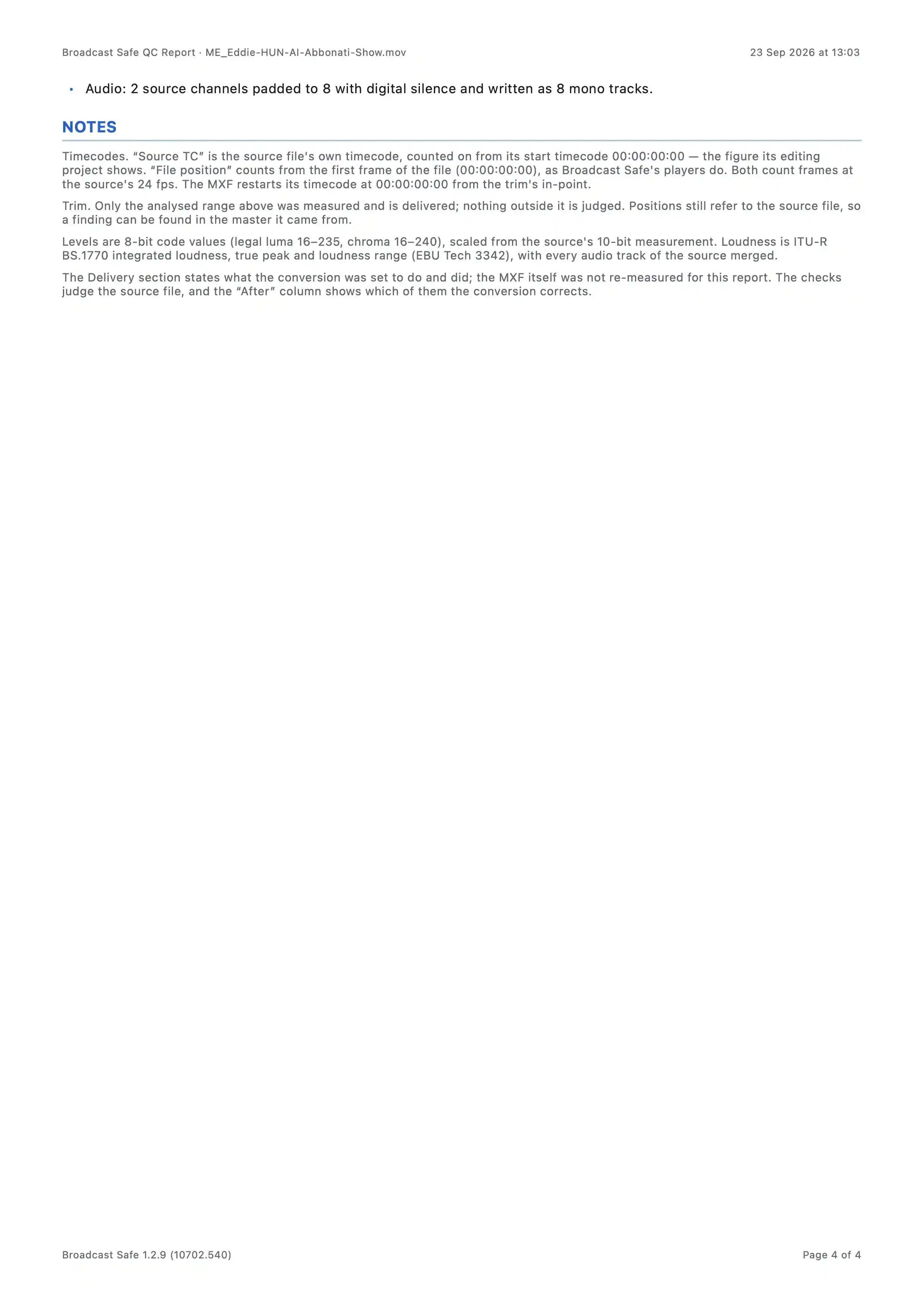
The page presents the closing portion of the QC report: a continuation bullet from the applied-corrections list and a NOTES section that defines how to interpret every timecode, level, loudness and delivery statement elsewhere in the report.
- Applied correction — “Audio: 2 source channels padded to 8 with digital silence and written as 8 mono tracks.” This records the channel-layout change the conversion performed. From the operator’s perspective it confirms that the delivered MXF’s audio track structure matches the target delivery’s channel count, and that silence was used to fill unused channels rather than duplicating or dropping source content.
- Timecodes note — Defines two position systems: “Source TC” (the source file’s own timecode, counted from its start timecode) and “File position” (frames from the first frame of the file, as the players show). Both count at the source frame rate; the delivered MXF restarts its timecode at zero from the trim’s in-point. This matters because the report’s timecodes must be compared against the NLE’s displayed source timecode, not the MXF’s reset timecode.
- Trim note — States that only the analysed range is measured and delivered; nothing outside it is judged. Positions remain source-relative so a finding can still be located in the original master. The functional impact is that the operator knows the report describes exactly the portion that will be delivered, and any note about faults outside that range is irrelevant.
- Levels and loudness note — Explains that all level figures are 8-bit code values (legal luma 16–235, legal chroma 16–240) scaled from the source’s 10-bit measurement. Loudness is ITU-R BS.1770 integrated loudness, true peak and loudness range (EBU Tech 3342), with every audio track of the source merged before measurement. This defines the units and the measurement basis so the operator does not misread a level or assume per-track loudness.
- Delivery section note — Clarifies that the Delivery section states what the conversion was set to do and did; the MXF itself was not re-measured for the report. The checks judge the source file, and the “After” column shows which checks the conversion corrects. This prevents the reader from treating the Delivery section as a post-encode measurement of the delivered file.